
cto.new is an AI code intelligence developed by Engine Labs, Inc. It understands and performs programming tasks by tapping into developers' existing toolsets, such as Jira, GitHub, Slack, and others. This intelligent body can utilize a variety of large-scale language models (including OpenAI's GPT family, Anthropic's Claude family, and Google's Gemini family) to plan tasks, write code, and even fix bugs in a program.
The core goal of cto.new is to lower the barrier to using AI programming tools. It offers a completely free model that allows more development teams to integrate it into their daily work as a way to improve the efficiency of software development. The tool is designed to be more than just an aid for a single developer, but to accommodate the collaborative processes of an entire team. It understands shared worklists and task handoffs, and provides assistance throughout the software development cycle, from task planning to code review.
Reverse 2API Project: https://github.com/lzA6/enginelabs-2api
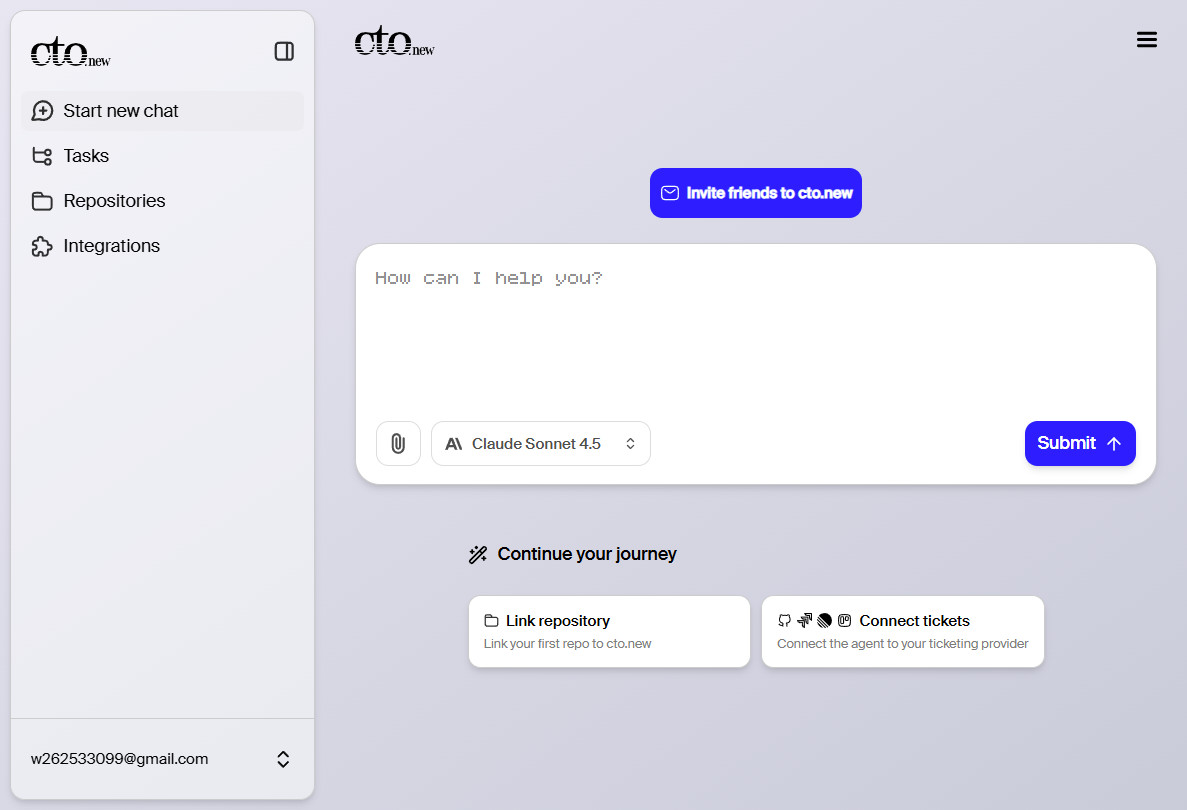
Function List
- Automated programming tasksThe chat interface allows users to assign tasks, such as "fix a bug" or "develop a new feature," and intelligences can autonomously plan and execute coding tasks.
- Multi-model intelligent routing: Integrates several industry mainstream large language models and automatically selects the most appropriate model to process according to the characteristics of the task.
- Native Workflow Integration: The ability to connect with a wide range of development and collaboration tools such as Linear, Jira, GitHub, GitLab, Slack, etc., to work in an environment familiar to developers and enable a seamless flow of contextual information.
- Teamwork Design: Designed for shared team work and task handoffs, not just programming requests to handle individual files, and able to adapt to team development processes.
- contextual understanding: Intelligentsia are able to access contextual information about the entire codebase, associated tools, and related documents while performing tasks, leading to a more accurate understanding of task requirements.
- Totally free: cto.new offers a free AI programming service that users can use without providing a credit card or API key.
Using Help
cto.new is used as an AI code intelligence primarily through a chat interface and integration with existing development tools. It doesn't require a complex local installation, and users can start it by registering and associating their own tools directly on the web side.
Step 1: Registration and authorization
- interviews
https://cto.new/Official website. - You can choose to sign in directly using your GitHub, GitLab, Linear, or Google account, or you can sign up using your email address.
- After logging in for the first time, you will be guided through the authorization setup. You need to connect cto.new with your code repository (such as GitHub or GitLab) and project management tools (such as Jira or Linear). This step is necessary because it gives the AI intelligences access to read code, analyze tasks, and commit code.
Step 2: Start a task
The core operations of cto.new are done in its chat interface.
- Initiate a dialogue: Upon entering the main interface, you will see a chat window. You can assign tasks to cto.new in natural language as if you were having a conversation with a coworker. For example, you can type, "Please fix a button display error on the login page, the related task is in Jira's work order TICKET-123."
- provide a context: Since cto.new is already integrated with your tool, it will automatically read the
TICKET-123Work order descriptions, comments, and associated code branch information to understand the full context of the task. - Creating Intelligentsia: Upon receiving a command, cto.new creates one or more "planning and coding agents". These agents are instances that perform specific tasks in the background. You can see all running agents and their status in the sidebar of the chat interface.
Step 3: Workflow of Intelligentsia
- Planning: Intelligence will first analyze the requirements and break down a complex task into a series of small, executable steps. For example, fixing a vulnerability might be broken down into: reproducing the problem -> locating the wrong code -> writing the fix logic -> adding unit tests -> committing the code.
- Coding: The smart body will start writing and modifying code according to the planned steps. It will automatically check out new code branches, make changes, and then push the code to the repository.
- Communication and Feedback: Throughout the process, if the intelligence encounters uncertainty or needs to make a decision, it will ask you questions through the chat interface. For example, "Here are two fixes, which one do you favor?"
- Mission accomplished: Once the code is written, the Intelligence will automatically create a Pull Request based on your settings and notify you of the review.
Featured Function Operation:
- Find and fix a bug: You can just tell it, "We have a calculation error in our payment module, please help troubleshoot and fix it." cto.new will scan the relevant code base, try to locate it and give a fix.
- Work on a ticket: Paste a work order link or number directly from Jira or Linear, and cto.new takes over the task, automating the entire process from understanding the requirements to submitting the code.
- Configuration and Setup: in
Settings & ConfigThe menu allows you to make more detailed configurations, including:Models: Select or adjust the language model that the AI intelligences can use.Repository Settings: Manage authorized code repositories and configure related permissions.Environment Variables: Set the required environment variables for the intelligences when they run the code.
This deep integration of AI intelligences into existing workflows avoids the hassle of switching between different tools and allows developers to put more effort into their creative work.
application scenario
- Automate routine programming tasks
For scenarios where repetitive code needs to be written or common bugs need to be fixed, developers can assign these tasks directly to cto.new. For example, automatically generating API interface code based on the product requirements document, fixing routine bugs found during testing, or supplementing unit tests for new features. This saves development time and allows engineers to focus on more complex architectural designs. - Accelerated product feature iteration
When teams need to develop and launch new features quickly, they can use cto.new to handle standardized development sessions. After the product manager creates a task in Jira or Linear, the AI intelligences can directly take over and complete the entire process from code writing to submitting a merge request, thus shortening the development cycle and helping the team respond faster to market changes. - Assisted code review and refactoring
Developers can ask cto.new to analyze the existing code base and suggest refactoring to improve code quality or performance. For example, it can be instructed to, "Please check the code of the user management module and identify areas in it where performance can be optimized." AI intelligences can act as a tireless technical partner to help identify potential problems.
QA
- What is cto.new?
cto.new is an AI code intelligence that connects to tools commonly used by developers (e.g. GitHub, Jira) and uses large-scale language models to automate programming tasks such as writing code and fixing bugs. - Is this tool free?
Yes, according to its official website and release statement, cto.new is currently a completely free tool that does not require users to provide a credit card or API key when signing up to use it. - What programming languages and tools does it support?
cto.new supports multiple programming languages by integrating with mainstream large-scale language models. It has native access to development and project management tools such as GitHub, GitLab, Linear, Jira and Slack. - Is it safe to use cto.new? Will my code leak?
As a tool that requires access to a codebase, data security is of utmost importance. cto.new should have a detailed privacy policy and data security instructions in its official documentation and on its website. Usually such tools adopt encryption measures and strict permission controls to protect user code. Users are advised to read their privacy policy and security documents (the official website has Trust, Privacy, Terms and Legal Terms pages) before using them.