
QoderWork is part of Alibaba's Qoder QoderWork is a revolutionary desktop AI agent tool designed to expand the capabilities of artificial intelligence from mere “conversation and chatting” to true “task execution”. As an intelligent assistant running on the desktop, QoderWork can directly manipulate the user's file system and applications through natural language commands to automatically complete tedious daily tasks. It not only intelligently identifies and organizes messy local files, photos and folders, but also processes Excel sales data in depth and automatically generates visual charts and analysis reports. Even more powerful is its understanding of multimedia content, such as converting a recorded interview directly into a video script, a public post, or a Xiaohongshu note. qoderWork adheres to the principle of “privacy first,” with file manipulation mainly performed locally, and supports the latest MCP (Model Context Protocol) protocol, allowing users to automate their daily work. QoderWork supports the latest MCP (Model Context Protocol) protocol, which allows users to access more external tools, making it a true “can-do” personal productivity co-pilot.
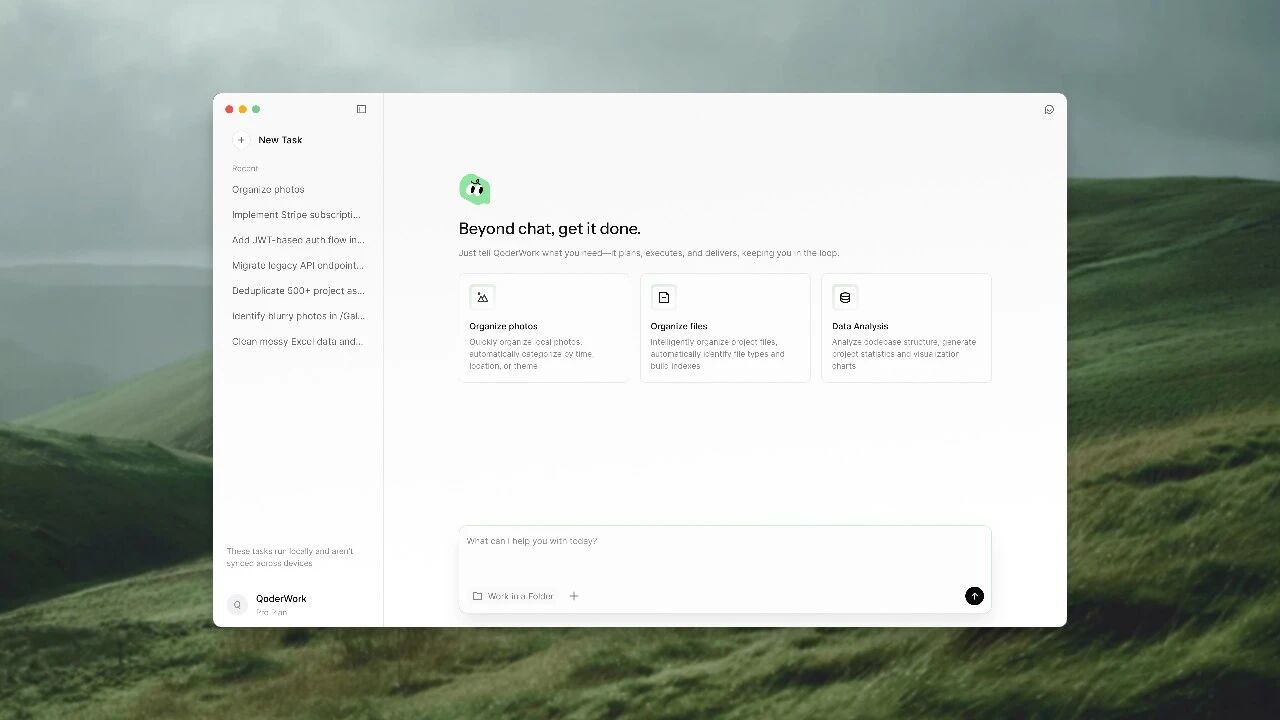
Function List
- Intelligent file organization (File Organization): Understands file content, automatically recognizes file types, and organizes cluttered desktops and download folders by date, subject, or project.
- Automated data analysisIt supports reading data directly from Excel or CSV tables, cleansing, trending, and automatically generating multi-dimensional charts, analytical reports, and even PPT presentations according to the commands.
- Content creation and transcription: Multimodal comprehension capability to analyze audio or long documents, automatically extract key information and reorganize it into video scripts, social media copy (e.g., Xiaohongshu, WeChat), or meeting minutes.
- MCP Extended SupportBuilt-in mainstream MCP (Model Context Protocol) tools, support for user-defined Skill (Skill), you can connect to more third-party services to create a proprietary workflow.
- Mission planning and implementationThe AI is differentiated from traditional AI by its question-and-answer model and its “Agent” capability, which breaks down complex goals into multiple steps and automatically executes them step-by-step.
- Local Privacy Protection: Core file operations run locally, sending necessary text snippets only when needed for large model comprehension, and providing fine-grained permission control so that unauthorized directories are inaccessible to the AI.
Using Help
QoderWork is currently in beta stage and is mainly aimed at desktop users. Below is a how-to guide based on its core design concepts to help you quickly get started with this intelligent desktop agent.
1. Installation and initialization
- download and install: Visit the Qoder website to download the QoderWork installer for Windows or macOS.
- Account Login: Launch the app after installation is complete, and log in with your Qoder account (or an account associated with AliCloud/Alipay/GitHub, etc.). Since it's in Beta, you may need an invitation code or wait in line to open it.
- authority grantQoderWork will QoderWork will guide you through the privacy settings to make sure it only operates in the areas you allow it to.
2. Operational flow of core functions
QoderWork's interface is extremely simple, usually a hovering dialog box or sidebar where you simply issue commands as if you were talking to a live assistant.
Scenario 1: Cleaning up a messy desktop
- issue instructions: Type in the input box, “Help me organize the ‘Downloads‘ folder by filing all the pictures by the month they were taken, and put all the PDF contract files in the ”Contracts' folder. "
- Plan Confirmation: QoderWork doesn't mess with files right away, it scans the directory and then pops up an “Execution Plan” that lists which files it's going to move and which folders it's going to create.
- operateClick on “Confirm” or “Start” and you will see the files move automatically in Explorer, with the progress bar updating in real time.
Scenario 2: Automated analysis of sales data
- Drag and drop files: Drag an Excel file containing sales data directly into QoderWork's dialog box.
- Issuance of requirementsINPUT: “Analyze this table to identify the three regions with the worst sales declines in the last quarter, generate a bar graph, and finally write a short analytical report.”
- Getting resultsAI automatically reads the table content (without you having to manually open Excel) and after a few seconds, displays the generated chart image directly in the dialog box and outputs a paragraph of analysis text. You can directly click on “Export as PPT” or “Copy Report”.
Scenario 3: From Recording to Copywriting
- Upload Material: Upload a recording of a meeting or an audio file of an interview.
- Customized CopywritingInput: “This is an interview about a new product launch, please help me organize it into a note suitable for posting on Little Red Book, with a lively tone, bring Emoji, and distill 3 core selling points.”
- Generate Delivery: QoderWork will first transcribe the audio into text, understand the context, and then output the copy in the Little Red Book format. You can follow up with, “And then help me write a short video shooting script based on this copy.”
3. Advanced Play: Customizing Skills and MCPs
- connection kit: Look for the “Extensions” or “MCP” option in the settings and you can add support for MCP External tools for the protocol (e.g. Google Drive connector, Linear task board, etc.).
- Creating WorkflowsYou can set a combination of common commands (macro), e.g. “Weekly Report Mode”: Automatically collect summaries of documents modified during the week -> Summarize data -> Generate a draft of the weekly report.
application scenario
- Administrative and Sales Assistant
Salespeople don't need to be proficient in Excel functions, just send QoderWork a monthly sales flow chart and tell them, “Help me figure out the top 5 products and growth rates for this month,” and they'll instantly have the accurate data and charts they need to report to their bosses. - Self-media content creators
Bloggers can feed lengthy interviews or long-form industry whitepapers to QoderWork and ask them to “distill 5 counter-intuitive insights and generate 3 compelling headlines in 30 seconds,” dramatically reducing the time it takes to pick a topic and shuffle through the process. - You can even be a “digital butler.”
QoderWork is the best savior for users whose computers are always on and their desktops are filled with thousands of files. All it takes is one sentence, “Help me clean up my desktop and file old files by year”, and hours of manual organizing can be done automatically by AI in the time it takes to drink a cup of coffee.
QA
- Does QoderWork charge a fee?
QoderWork is currently in public or invited beta testing and usually offers free trial credits. The full version may be available on a subscription basis or on a pay-as-you-go basis. Token Please pay attention to the latest announcement on the official website for the usage charge. - How is it different from a chatbot like ChatGPT?
ChatGPT QoderWork is an “Agent” with arms and legs that can directly operate your operating system and perform real tasks, mainly by “chatting” with you in your browser, but it can't directly help you to move files in your computer or operate local software. QoderWork is an "Agent" with arms and legs that can directly operate your operating system and perform real tasks. - Will my files be uploaded to the cloud?
QoderWork is designed with privacy first. Operations such as moving and renaming files are run entirely locally. Only when you ask the AI to read the contents of a file (e.g., summarizing a document, analyzing data) is the text encrypted and sent to a large model for inference, and is not used to train general-purpose models (subject to specific privacy terms). - What is MCP?
MCP (Model Context Protocol) is an open standard that allows AI models to connect to external data and tools in a standardized way. This means that QoderWork will be able to access any MCP-enabled software in the future, expanding its capabilities indefinitely.