If someone asks what the most rewarding AI skills to learn in 2026 are, the answer has to be Skills.
From Claude Code to OpenClaw and Hermes Agent, almost all mainstream Agents are relying on Skills to improve the quality and efficiency of their work. Agents without Skills are like new employees who need repeated training, while Agents equipped with Skills are like experienced coworkers who work well together out of the box.
Skills is becoming one of the most influential innovations in the Agent space. In short, the model is the brain, the Agent is the body, and Skills is the hands. Mastering how to “teach” AI is more important than just learning how to “ask” AI. Encapsulate repetitive tasks, tacit team knowledge, and operational details into .skill files, and they will become the most reliable digital assistants.
1. What are Skills
On October 16, 2025, Anthropic first released Agent Skills. the feature was initially only available in Claude Code and required a Pro paid account.
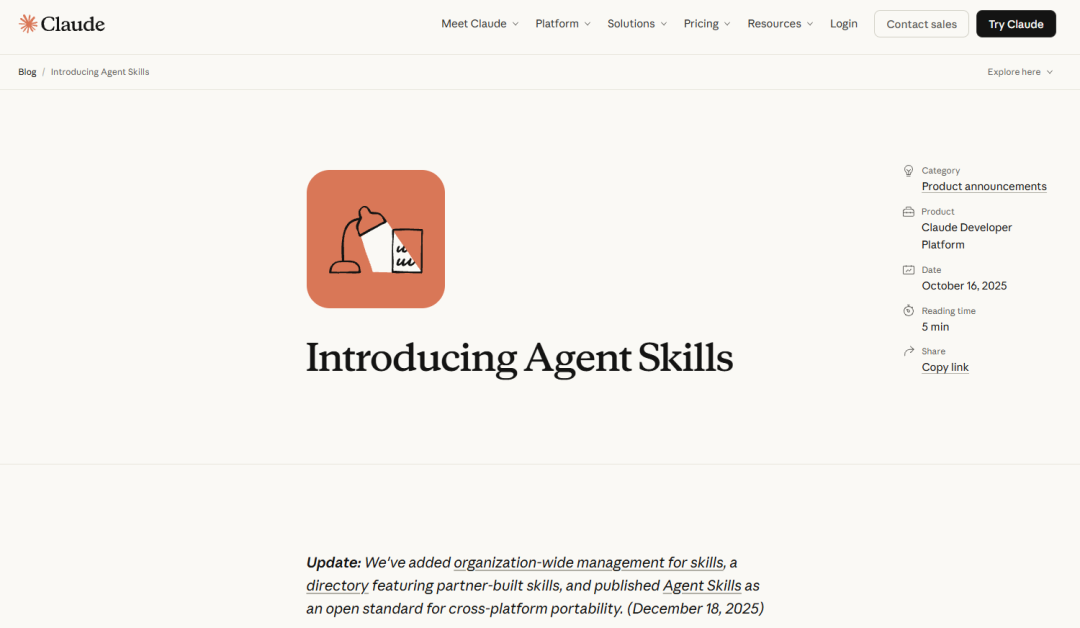
Anthropic releases Agent Skills
On December 18 of the same year, Anthropic made Agent Skills available to all users as a unified standard. Subsequently, Codex, Cursor, Antigravity, OpenCode, Trae, Qoder, CodeBuddy and other Coding Agents, as well as Claude Cowork, Skywork, MiniMax Agent, Buckle and other desktop Agents supported Skills one after another.
OpenClaw, which burst onto the scene after Spring 2026, and Hermes Agent, a recent hit, also support this feature.
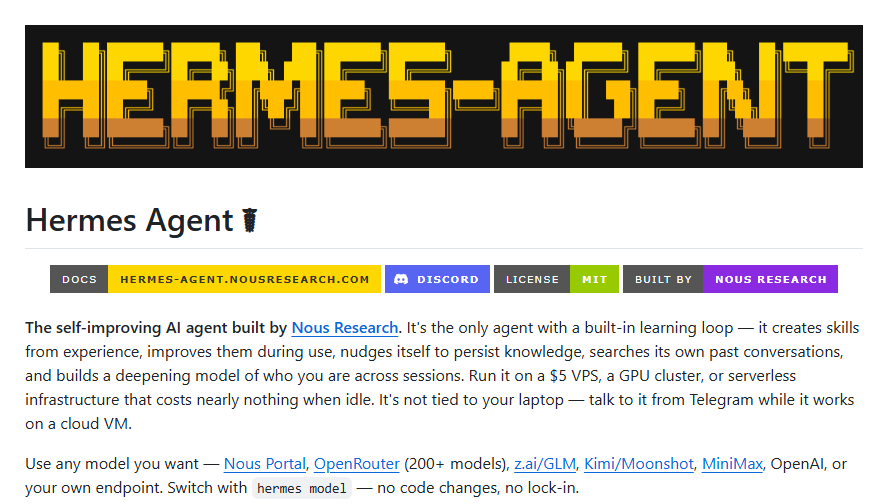
Skills means ”skill packages”. Humans have a variety of skills, such as biking, swimming, driving, cooking, and photography; Skills is the skill set for AI.
Anthropic's official definition: Skills are a set of modular capabilities that allow developers to enhance Claude Code with structured folders. Each Skill contains a core SKILL.md file and related auxiliary resources. When a user makes a request to Claude Code, the system will automatically determine whether or not to invoke the corresponding Skill based on the request content and Skill description.
A more straightforward explanation is that Skills are standard operating manuals (SOPs) customized for AI. Each Skill has a dedicated folder for instructions, resource files, and references. This folder allows the AI to move quickly from being a ”novice” to a ”skilled employee”.
Use a metaphor to illustrate the difference between the three:
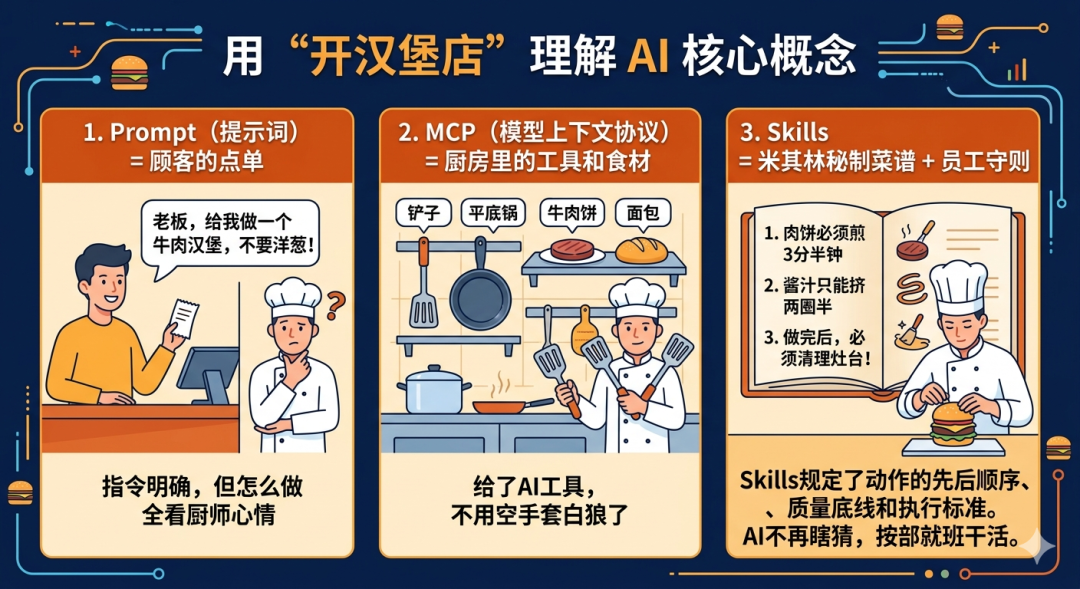
Prompt is like a customer's order, where the instructions are clear but the execution is up to the chef, MCP provides the kitchen tools and ingredients so that the AI no longer has to work with empty hands, and Skills is the secret recipe and staff code, which defines the sequence of actions, quality and execution standards. With Skills, the AI works step-by-step without having to guess the user's intentions.
2. Core structure of Skills
After understanding the basic concepts, analyze the Skills architecture at the folder level.
Open the Claude Code installation folder (located by default on the C drive, with the filename .Claude) and locate the Skills file directory, which usually contains the following structure:
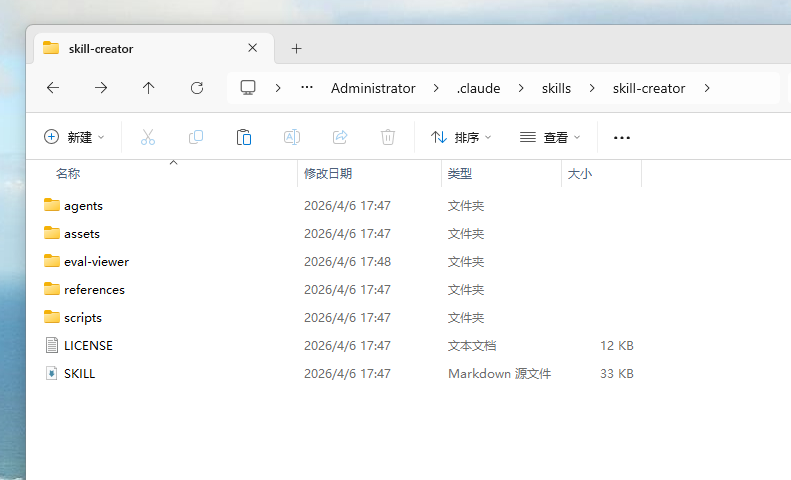
Folder structure of "skill-creator" skill
- SKILL.md: SKILL core commands, including name, trigger conditions, task flow, and execution guidelines.
- scripts: store executable code, such as Python, Bash scripts
- References: Stores on-demand reference documentation, such as technical specifications, API documentation, code snippets, design guidelines.
- assets: storage material resources, such as templates, fonts, images, logos, etc.
The standard Skill structure is as follows:
skill-name/
├── SKILL.md (必需)
│   ├── YAML frontmatter (必需)
│   │   ├── name: (必需)
│   │   └── description: (必需)
│   └── Markdown instructions (必需)
└── Bundled Resources (可选)
├── scripts/          - 可执行代码
├── references/       - 参考文档
└── assets/           - 资源文件
Except for SKILL.md, which is mandatory, all other options are optional and can be configured flexibly as needed.
The Agent performs the following process when it runs a skill:
- Use SKILL.md as a first guide to understand the requirements of SKILL for large models
- Determine whether to call scripts, references, and assets in conjunction with the current task.
- User tasks are accomplished through a ”plan-do-watch” feedback loop.
SKILL.md is the most critical part of the architecture:
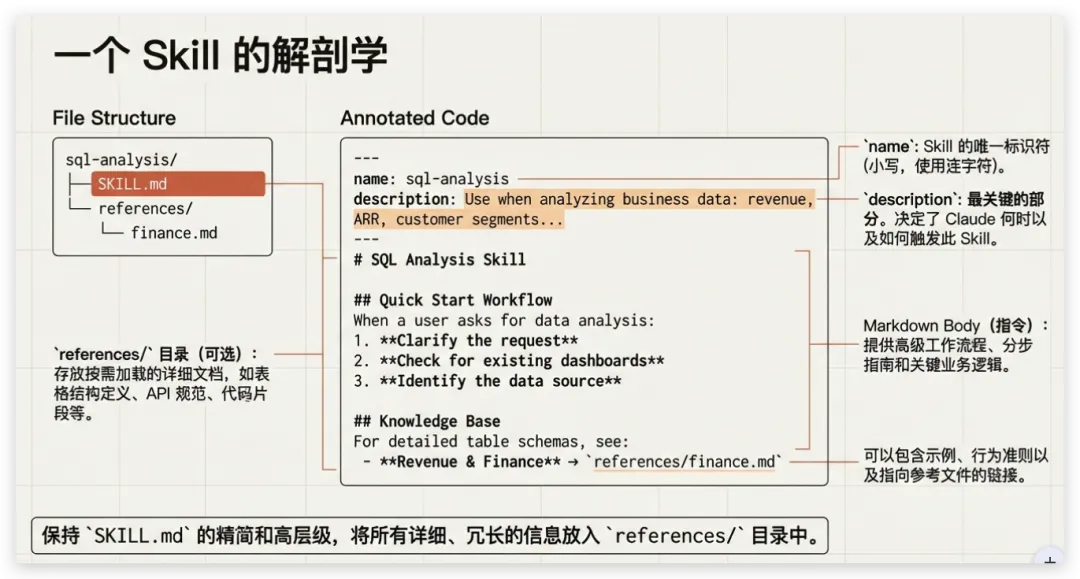
SKILL.md internal dissection (picture by Cang He)
First is the name, which is usually composed of English and hyphens, such as "frontend-design".
The description is the core aspect of YAML metadata, and its quality directly affects whether the Agent can accurately trigger the skill.
As an example, Anthropic's official frontend-design skill has the following description field:
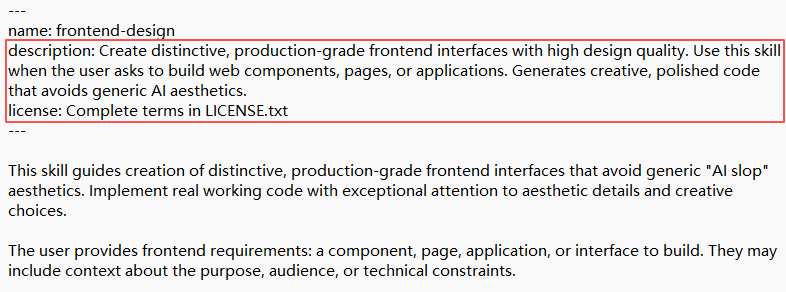
The description field of "frontend-design.skill".
Translate to Chinese: The skill is used to create professional front-end interfaces with advanced design, suitable for web components, pages or application development scenarios, generating creative and sophisticated code, avoiding the uniform AI style.
The description field directly determines the circumstances under which Claude Code automatically triggers and loads the skill. not written clearly or accurately enough, even if the skill is powerful, the Agent may not remember to use it when needed.
According to best practices, the core strategies and templates for writing a good description are as follows:
Core principle: Trigger is justice
The first task of the Description is not to show it to a human, but to the AI routing mechanism. Two questions need to be clearly answered: what does this skill do? In what scenarios or what words should the user use it?
“The ”golden structure" formula
High-quality descriptions usually follow: [one-sentence core functionality] + [specific actions to perform] + [clear trigger keywords/scenarios]
Excellent writing example:
Case A: Code review skills
name: security-code-review
description: Reviews code for security vulnerabilities and best practices. Use when the user asks to "review code", "check for bugs", "analyze security", or mentions specific issues like SQL injection, XSS, or performance bottlenecks.
Case B: PDF processing skills
name: pdf-processor
description: Extracts text, tables, and metadata from PDF files; merges or splits documents. Use when working with PDF files, converting PDFs to text, filling forms, or when the user uploads a PDF and asks for summary/extraction.
The secret to writing a good description is to model the way users ask questions. Imagine how to make requests to AI and write all the keywords for those requests in the description.
The Markdown format of the standard SKILL.md is roughly as follows:
---
name: 你的skill名称
description: 简要描述该技能的功能以及何时该使用它
---
# 你的技能名称
## 指令 (Instructions)
为 Claude Code 提供清晰、逐步的操作指南。
## 目标 (Goal)
## 示例 (Examples)
展示使用该技能的具体代码或操作案例。
Example of SKILL.md for creating a "PDF Analysis" skill:
---
name: pdf
description: 从PDF文档中提取和分析文本。当用户要求处理或阅读PDF时使用。
---
# PDF 处理技能:
1.使用本文件夹中的extract_text.py脚本提取PDF中的文本:
python3 extract_text.py <input_file>
2.提取后,请以结构化格式总结要点。
3. Skills' three core mechanisms
The core architecture of Skills consists of three mechanisms that work in tandem.
Take the SKILL.md setting for Remotion skill (which specializes in making videos) as an example:
---
name: remotion-best-practices
description: Best practices for Remotion - Video creation in React
metadata:tags: remotion, video, react, animation, composition
---
## When to use
Use this skills whenever you are dealing with Remotion code to obtain the domain-specific knowledge.
## Captions
When dealing with captions or subtitles, load the [./rules/subtitles.md](./rules/subtitles.md) file for more information.
## Using FFmpeg
For some video operations, such as trimming videos or detecting silence, FFmpeg should be used. Load the [./rules/ffmpeg.md](./rules/ffmpeg.md) file for more information.
## Audio visualization
When needing to visualize audio (spectrum bars, waveforms, bass-reactive effects), load the [./rules/audio-visualization.md](./rules/audio-visualization.md) file for more information.
## How to use
Read individual rule files for detailed explanations and code examples:
The SKILL constrains AI behavior through three mechanisms:
Mechanism 1: Smart Switch (YAML metadata)
At the beginning of each Skill file (the area wrapped in -) is the Control Panel, which is always loaded as metadata in the Claude Code System Tips, like ”switches” and ”permission cards” for the Skills.
Mechanism II: pay-as-you-go reference (progressive disclosure)
Traditional AI has a ”memory” problem: if all development specifications are entered at once, the short-term memory (context window) will be burst, causing the AI to hallucinate.
Skills are cleverly designed so that they don't take up brain space during the day, but are only loaded when needed. Users create dozens of Skills as if they were tools stored on a bookshelf, and Claude Code doesn't usually go through them, but only loads the relevant ”cheat sheet” into the brain when a specific skill is triggered.
Mechanism III: Action Orientation and Sub-Agents
Skills not only lets the AI read the instructions, but also lets the AI ”do the execution”. Under the guidance of Skills, Claude Code can execute command lines, search files, run tests and other operations. For complex tasks, the Agent can call a Subagent to specialize in the sub-tasks, and report the results after completion.
Progressive Disclosure is the most important design philosophy of Skills; instead of loading all at once, Skills information is presented in three progressive layers:
| level | element | Timing of loading | Token quota | corresponds English -ity, -ism, -ization |
|---|---|---|---|---|
| first layer | Metadata (name + description) | Always in context | About 100 words | Determine when a skill is triggered |
| second layer | SKILL.md subject | After the skill is triggered | <5000 words | Core workflow |
| third floor | Supporting resources (scripts/references/assets) | Load on Demand | infinitely | Detailed reference and executable code |
The advantages of this design are clear: Assuming a Skill contains hundreds of pages of technical documentation, the context would quickly run out if all of it was loaded for each conversation. With progressive disclosure, Claude Code loads relevant documents only when they are needed, like using a well-organized guide book and reading only the chapters you need.
4. Difference between Skills and Prompt, MCP, Agent, Projects
After understanding Skills, you need to clarify how it differs from other concepts:
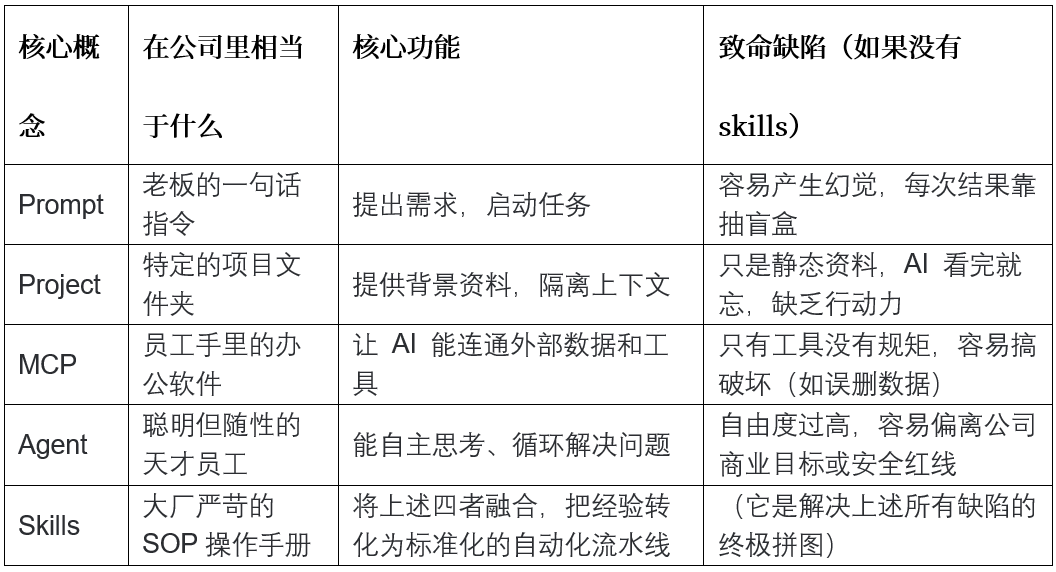
In short: Skills is the pre-made dish, Prompt is the ready-to-fry dish, Project is the ingredients, and MCP is the logistics and takeaway system. Through Skills, the practice has been pre-set, users only need to specify the name of the dish, AI can quickly and accurately execute, while saving Token costs.
In Claude Code, a SKILL.md file contains the following functions:
- Includes a fine-grained Prompt that informs the AI of the goals, methods, and expected results
- Specify tools and executable code that AI can use
- Command Agent to follow a strict sequence to ensure that it is not deviated from the track
5、How to find good use of Skills
There are three main channels for acquiring quality Skills:
1) Official Recommendations
Users who don't want to toss code and are looking for an out-of-the-box solution, this is the best entry point.
Anthropic on GitHub has an official set of powerful basic Skills pre-built, such as xlsx skill for working with complex data, and pptx skill for automating the layout of business presentations. type in a single sentence, and the AI will master these advanced skills.
Anthropic Skills:
https://github.com/anthropics/skills
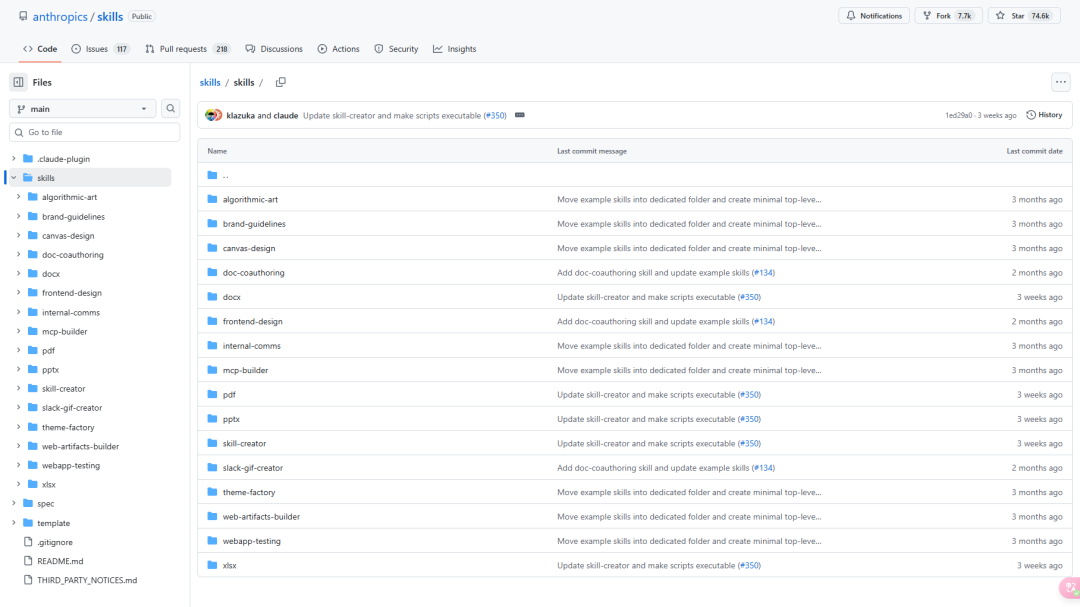
Official Anthropic Skills
It is highly recommended to install "Skill-creator", which is a skill creator that has more than 80k stars on GitHub and makes it extremely easy to create any skill.
Skill-creator:
https://github.com/anthropics/skills/tree/main/skills/skill-creator
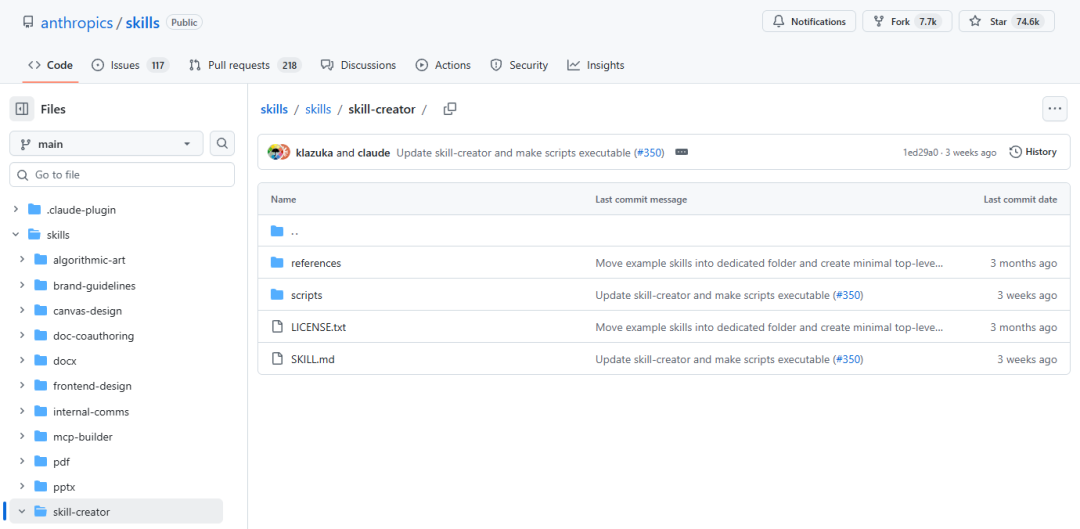
Skill-creator.skill
The installation command is simple to enter in Claude Code:
Help me install this skill, the repository address is:
https://github.com/anthropics/skills/tree/main/skills/skill-creator
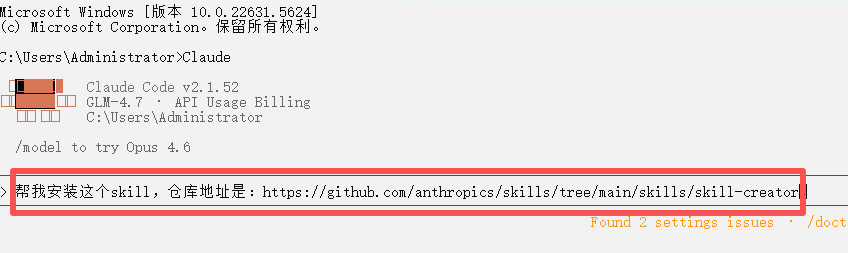
skill-creator installation commands
2) Open Source Skills Market
Agent Skills as an open standard to which developers around the world are contributing.
agentskills.io is the ”App Store” or ”npm Source” of the AI era, an officially recommended global skills registry that searches the work of experts from a wide range of industries.
The GitHub Open Source Treasure Trove is a programmer's passion, with direct searches for anthropics/skills official repositories or community-maintained lists of awesome-agent-skills.
The OpenSkills open source repository on GitHub is multi-platform compatible and automatically creates Markdown files of project rules to ”teach” other AI agents to use Skills.
OpenSkills program address:
https://github.com/numman-ali/openskills
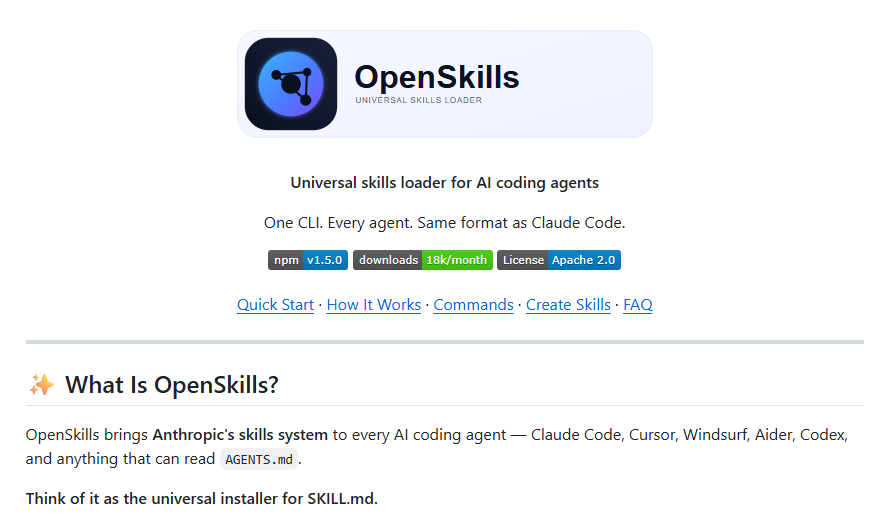
There are also business platforms dedicated to Skills such as skillsmp.com and skillsdirectory.com.
3) Create your own
The best Skills on the web are often written in-house. Downloaded skills are good, but they're common sense; it's your own ”unspoken business secrets” that really build a business moat:
- Company-specific code naming conventions
- Gold Medal Sales Response to Customer Refunds with Private Domain Words
- Treasury's invoice compliance bottom line for processing complex claims
6, hands-on production Skills: HTML infographic generator
When you want to make a visual infographic from text in your daily work, you can refer to the following cue words to generate it:
提炼下面文字内容的核心关键点,创建一个HTML网页。
文字内容:
{这里是一段文字}
网页的设计要求如下:
1.视觉设计:采用{Magazine Layout}风格布局,{深色}主题色,营造现代高端氛围。
2.字体与排版:
·使用超大字体或数字突出核心要点,中文采用大号粗体,强调视觉冲击力。
·英文使用小号字体作为点缀,与中文形成比例反差,提升设计层次感。
3视觉元素:
·融入超大视觉元素(如标题、背景图或装饰)以突出重点,与小型元素形成强烈对比。
·使用简洁的勾线风格图形作为数据可视化或配图元素,保持现代感和清晰度。
4.色彩与效果:运用高亮色(单色透明度渐变)营造科技感,每种高亮色独立使用,避免不同高亮色之间的渐变混杂。
5.技术要求:引入专业图标库(如Font Awesome或Material Icons,通过CDN加载),避免使用emoji作为主要图标。
6.内容要求:提炼内容关键要点,不忽略重要细节。
Using this cue word to organize the model information, the AI can generate a visual infographic:
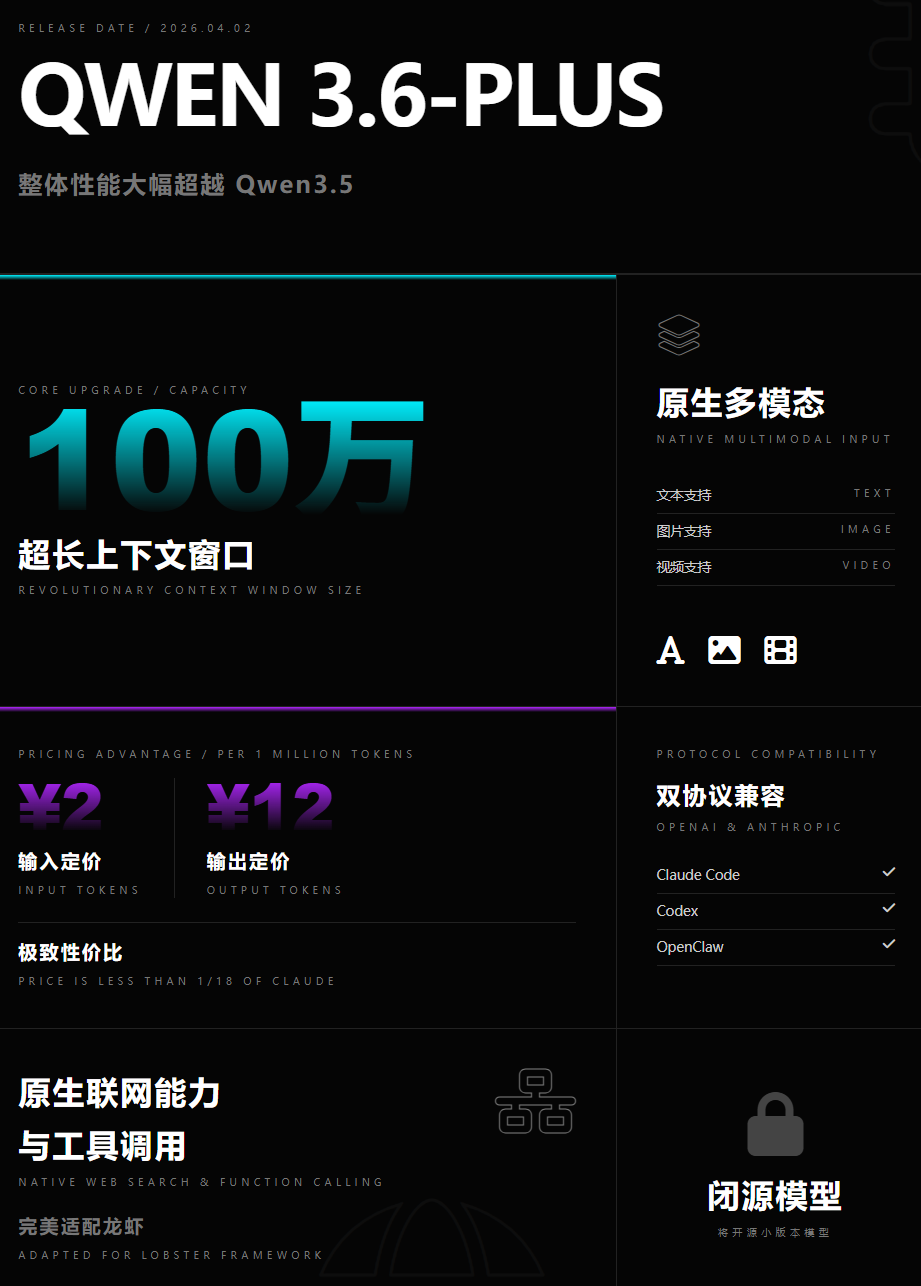
Qwen3.6-Plus Model Infographic
It's a pain to copy the prompt, go to the AI Chat website to generate it, download it, and take a screenshot every time. You can use this prompt to create an "HTML Infographic Generator" skill and install it into Claude Code or OpenClaw. When you need it in the future, you can just tell Agent "Call HTML Infographic Generator.skill to generate xxx".
First, name the skill, using lowercase English, standard syntax, such as "html-infographic-generator", and connecting words with hyphens.
Following the Skills file structure design architecture described earlier, the infographic generator typically requires only the SKILL.md file, which can be augmented with design guidelines in the references folder and examples in the assets folder as needed:
html-infographic-generator/
├── SKILL.md                    # 入口文档(设计规范+操作流程)
├── references/
│   └── design-guide.md         # 详细设计指南
SKILL.md that is Markdown format, is a lightweight markup language, using plain text format to write documents, can be converted to HTML/PDF.
SKILL.md usually contains:
---
name: 你的skill名称
description: 简要描述该技能的功能以及何时该使用它
---
# 你的技能名称
## 指令 (Instructions)
为 Claude Code 提供清晰、逐步的操作指南。
## 目标 (Goal)
## 示例 (Examples)
展示使用该技能的具体代码或操作案例。
The top -wrapped area is YAML metadata, containing the name and description fields, which are the business cards that the Agent uses to identify Skill.
YAML metadata for "html-infographic-generator":
---
name: html-infographic-generator
description: 从用户文字中提炼核心关键点,生成Magazine Layout风格的深色主题HTML信息图网页;当用户需要将文字内容可视化、创建信息图、生成数据展示页面或制作图文混排页面时使用。
---
YAML metadata defines the functionality of the HTML infographic generator: this skill is loaded when a user needs to visualize content, create an infographic, generate a data presentation page, or produce a graphic mashup page.
The description field is the key to determining when the Agent automatically calls the skill, and is designed to be used in imperative sentences that omit the second person, e.g., ”Generate HTML from the user's uploaded text,” rather than ”Generate HTML from this text for me! ”. The word count is usually less than 500 words, including the skill trigger keywords.
After writing the YAML metadata are the specific execution instructions. The full SKILL.md for "html-infographic-generator.skill" is as follows:
# HTML信息图生成器
## 任务目标
- 本 Skill 用于:从用户提供的文字内容中提炼核心关键点,生成视觉冲击力强的HTML信息图网页
- 能力包含:文本关键点提炼、信息架构设计、HTML/CSS代码生成、视觉设计实现
- 触发条件:用户发送文字内容并希望生成可视化信息图、数据展示页面、图文混排网页
## 设计规范
### 1. 视觉设计
- **布局风格**:采用Magazine Layout(杂志排版)风格,强调网格系统、留白对比、视觉层次
- **主题色调**:深色主题,背景色使用 `#0a0a0a` 或 `#1a1a1a`,营造现代高端氛围
- **视觉层次**:通过大小、粗细、位置、色彩对比建立清晰的信息层级
### 2. 字体与排版
- **中文文本**:使用大号粗体(60-120px),突出核心要点,强调视觉冲击力
  - 标题字体:`font-weight: 700-900`
  - 推荐字体:Noto Sans SC、Source Han Sans(通过Google Fonts加载)
- **英文文本**:使用小号字体(12-16px)作为点缀,与中文形成比例反差
  - 字体选择:Roboto、Inter、SF Pro Display
  - 用途:副标题、注释、装饰性文字
- **行高与间距**:
  - 标题行高:1.1-1.3
  - 正文行高:1.6-1.8
  - 段落间距:使用em或rem单位保持比例一致性
### 3. 视觉元素
- **超大视觉元素**:融入超大标题、背景图或装饰元素以突出重点
  - 标题字号可达120-200px
  - 背景图使用低透明度(10-30%)避免干扰文字
- **对比原则**:超大元素与小型元素形成强烈对比
- **图形风格**:使用简洁的勾线风格图形作为数据可视化或配图元素
  - 可使用CSS绘制几何图形(圆、线、矩形)
  - SVG图标保持线条简洁(stroke-width: 1.5-2px)
### 4. 色彩与效果
- **基础色板**:
  - 背景:`#0a0a0a`、`#1a1a1a`
  - 主文字:`#ffffff`、`#f0f0f0`
  - 次要文字:`#888888`、`#666666`
- **高亮色方案**(单色透明度渐变):
  - 青色系:`rgba(0, 255, 255, 0.8)` → `rgba(0, 255, 255, 0.1)`
  - 洋红系:`rgba(255, 0, 255, 0.8)` → `rgba(255, 0, 255, 0.1)`
  - 金色系:`rgba(255, 215, 0, 0.8)` → `rgba(255, 215, 0, 0.1)`
  - 绿色系:`rgba(0, 255, 128, 0.8)` → `rgba(0, 255, 128, 0.1)`
- **渐变规则**:每种高亮色独立使用,避免不同高亮色之间的渐变混杂
- **科技感营造**:使用透明度渐变、发光效果(box-shadow)、渐变边框
### 5. 技术要求
- **图标库**:引入Font Awesome或Material Icons(通过CDN加载)
```html
<!-- Font Awesome -->
<link rel="stylesheet" href="https://cdnjs.cloudflare.com/ajax/libs/font-awesome/6.4.0/css/all.min.css">
<!-- Material Icons -->
<link href="https://fonts.googleapis.com/icon?family=Material+Icons" rel="stylesheet">
- font library: Introduction of Google Fonts
<link href="https://fonts.googleapis.com/css2?family=Noto+Sans+SC:wght@400;700;900&family=Roboto:wght@300;400;700&display=swap" rel="stylesheet"> - Ban emoji: Avoid using emoji as the main icon, and use professional icon libraries uniformly
6. Content requirements
- Key Points Refinement:
- Identify core themes, key data, important findings
- Retain important details without omitting key information
- Rationalize grouping and create a hierarchy of information
- information architecture:
- Main title: The most central message
- Subtitle: additional clarification or guidance
- Body paragraphs: elaboration
- Data/lists: structured presentation
procedure
Step 1: Text analysis and key point extraction
- Read user-supplied text content
- Identify core themes, key data, important findings
- Refinement of 3-8 core key points
- Prioritization and hierarchy of information
Step 2: Information Architecture Design
- Determine the content of the main headings (the most central information)
- Planning subheadings and body paragraphs
- Designing data presentation (numbers, lists, charts)
- Determine the layout of visual elements (header positions, decorative elements, white space areas)
Step 3: HTML Code Generation
- Introduction of required resources (Font Awesome, Google Fonts)
- Write the HTML structure:
<!DOCTYPE html> <html lang="zh-CN"> <head> <meta charset="UTF-8"> <meta name="viewport" content="width=device-width, initial-scale=1.0"> <title>信息图</title> <!-- 引入资源 --> </head> <body> <!-- 内容结构 --> </body> </html> - Write CSS styles:
- Basic styles (reset, font, color variables)
- Layout styles (grid system, containers, spacing)
- Component styles (headings, paragraphs, cards, icons)
- Effect styles (gradients, shadows, animations)
Step 4: Outputs and delivery
- Generate full HTML files (with inline CSS)
- Ensure code is well formatted and clearly commented
- Save a file to the user's working directory using the write_file utility
Resource Index
Design Guidelines
- Detailed design specifications: see references/design-guide.md
- Includes: Magazine Layout style notes, color schemes, layout templates, best practices
HTML Templates
- Base template: see assets/template.html
- Includes: infrastructure, resource introduction, sample styles, common components
caveat
Design Principles
- Visual impact is prioritized: Create visual focal points with oversized fonts, strong contrasts, and high-brightness colors
- white space is design: Utilizing white space to create a sense of breathability and sophistication
- Restraint in the use of color: dark background + single highlighted color to avoid color chaos
- Mobile Adaptation: Use of responsive design to ensure readability on different devices
technical realization
- All styles are inlined in the HTML file, ensuring that the file can be run standalone
- Use CSS variables to manage color and spacing for easy maintenance
- Prioritize the use of CSS for visual effects and reduce reliance on external images
- Ensure that code is clearly structured and well commented
content handling
- Do not leave out important details, but avoid information overload
- Use visual hierarchy to guide reading order
- Data-based content prioritizes the use of numbers + icons + short descriptions
usage example
Example 1: Product Data Display
importation: Users send a text description of the annual sales data of a product.
deal with:
- Refinement of core data: total sales, growth rate, market share, etc.
- Design information architecture: main headings (core data) + data cards (detailed indicators)
- Generate HTML: use oversized digital displays, gradient backgrounds, icon decorations
exports: Full HTML infographic file
Example 2: Summary of Key Knowledge Points
importation: Users send knowledge content or articles on a certain topic
deal with:
- Refinement of 3-5 core knowledge points
- Designing the information architecture: main headings + bullet point lists + additional notes
- Generating HTML: using numbered lists, icon tags, card layouts
exports: Structured HTML infographic
Example 3: Event Timeline
importation: the user sends a description of the development of an event
deal with:
- Refinement of key time points and events
- Designing Information Architecture: Timeline Layout + Event Cards
- Generate HTML: use vertical/horizontal timeline, node markup, gradient effects
exports: Timeline Style HTML Infographic
SKILL.md包含任务目标、设计规范、操作步骤、资源索引、注意事项和使用示例,详细规定skill的工作流程和输出标准,全程使用Markdown格式编写。
为帮助Agent更好理解该skill,还创建了references参考文件夹,包含design-guide.md设计指南:
HTML Infographic Design Guidelines
catalogs
-
- Magazine Layout Style Notes
-
- Dark Theme Color Scheme
-
- Font Typography Best Practices
-
- Visual Element Design Principles
-
- Common Layout Templates
Magazine Layout Style Notes
Core features
The Magazine Layout style draws on the visual design of traditional magazines, emphasizing:
-
- grid system: Column-based layout to create an organized visual structure
-
- leave a blank page for comparison: Lots of white space to highlight content and create a premium feel
-
- visual hierarchy: Establish clear prioritization of information through size, thickness, and position
-
- mix graphics and text: Organic combination of text and visual elements for enhanced presentation
design point
1. Grid system
/* 基础网格布局 */
.container {
display: grid;
grid-template-columns: repeat(12, 1fr);
gap: 24px;
max-width: 1400px;
margin: 0 auto;
padding: 40px;
}
/* 内容区域 */
.content-wide {
grid-column: span 12;  /* 全宽 */
}
.content-main {
grid-column: span 8;   /* 主内容 */
}
.content-side {
grid-column: span 4;   /* 侧边栏 */
}
2. Use of white space
- Page margins: 40-80px
- Element spacing: 24-48px
- Paragraph spacing: 1.5-2em
- List item spacing: 12-20px
3. Visual hierarchy
Level 1: 超大标题 (120-200px) - 最核心信息
Level 2: 大标题 (48-72px) - 重要章节
Level 3: 中标题 (24-36px) - 段落标题
Level 4: 正文 (16-18px) - 详细内容
Level 5: 辅助文字 (12-14px) - 注释、说明
design-guide.md is too long, details omitted.
This document details design styles, design points, page layout templates, and design checklists, and is an annotated document for the SKILL to help Agent understand the skill task.
The whole skill consists of 2 layers structure and 2 files: html-infographic-generator.skill can generate any text into top aesthetic infographic. No need to input Prompt, just give the text directly.Agent will summarize and refine by itself to generate HTML infographics, which is suitable for product introductions, promotional programs, new media materials and other visual content.
This skill has been published for free in the Buckle Skill Store, search for the keyword "HTML Infographic Generator" to find it and use it.
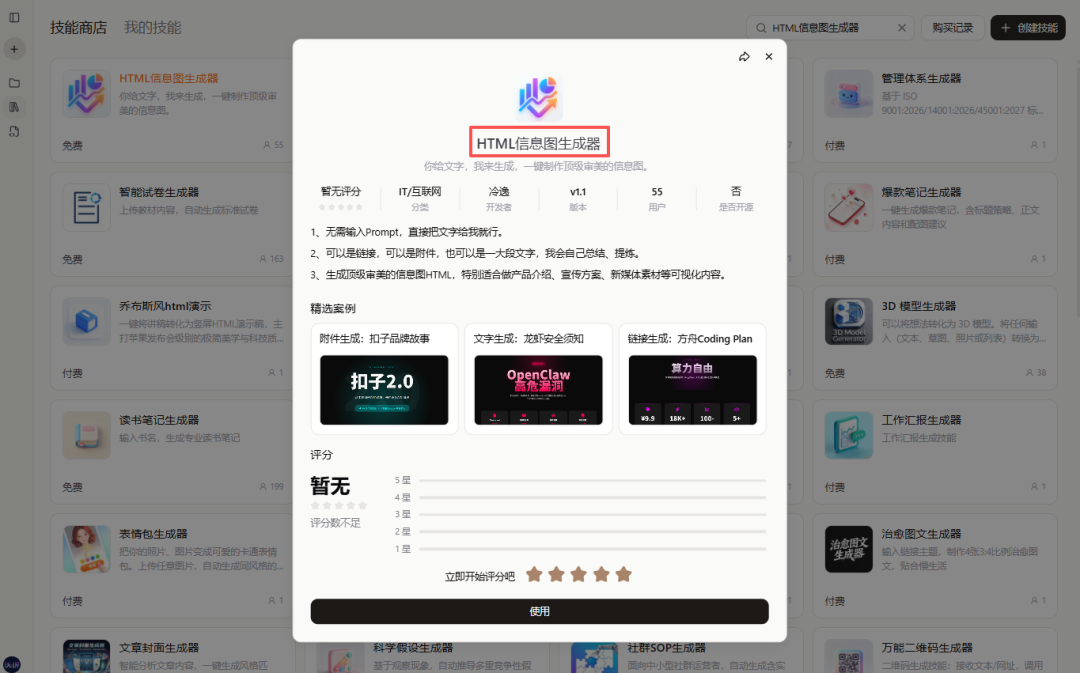
Called at the Button Store
Skill Address:
https://www.coze.cn/?skill_share_pid=7614920172729843731
7. Installation of public Skills
In addition to creating your own skils, you can also install publicly available skils.
Skill is usually hosted on GitHub, where Anthropic's open source skills are stored in a unified way.
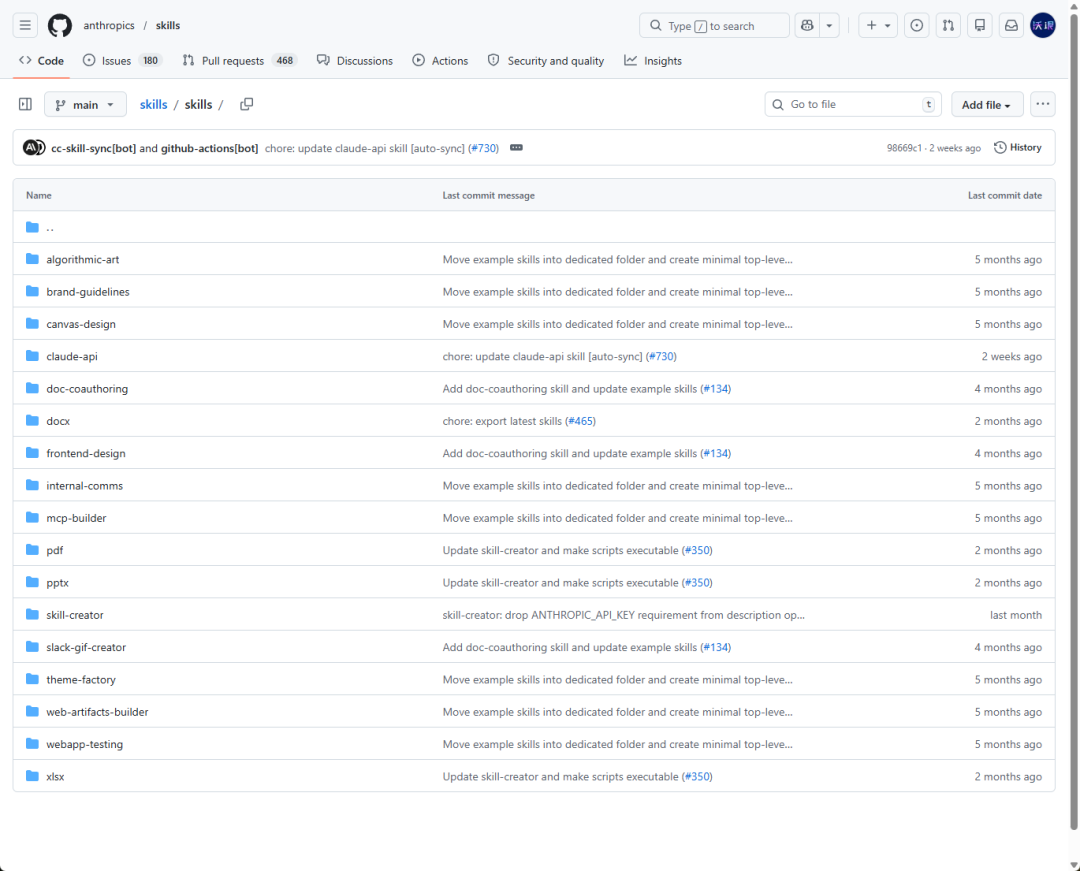
Anthropic's open source skill
Warehouse Address:
https://github.com/anthropics/skills/tree/main/skills
There are also some specialized SKILL markets:
https://www.skillhub.club
https://agentskills.io
https://skillsmp.com
https://www.skillsdirectory.com
https://skillhub.tencent.com
Installing the skill is easy, enter it in Claude Code or OpenClaw:
Help me install this skill, the repository address is:
https://github.com/anthropics/skills/tree/main/skills/skill-creator
"Skill-creator" is recommended to be installed by everyone, it's a skill that specializes in creating skills and has more than 80k stars on GitHub. with it, it's extremely easy to create a skill, just type it in:
Use creator skill to help me create a word to PPT SKILL.
Agent will automatically design the framework, SKILL.md and run the script to complete the skill creation.
8. Best Practices for Creating and Deploying Skills
According to the official Anthropic documentation and community practices, creating and deploying a skill typically involves four stages:
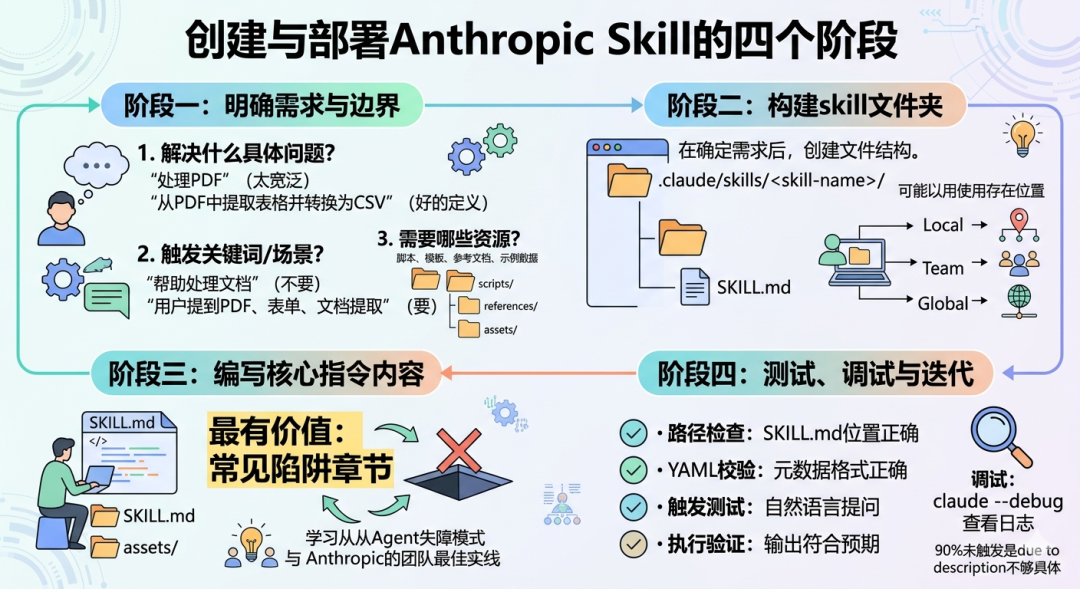
Stage 1: Defining needs and boundaries
Answer three questions before you do it:
1) What specific problem is this SKILL going to solve? The principle is ”single duty”, each skill focuses on only one competency. Process PDF” is too broad, ”extract tables from PDF and convert to CSV” is a good definition.
2) What is the keyword/scenario that triggered it? This determines how the description field is written. Instead of ”helps with documents”, write ”used to extract text and forms from PDFs when the user refers to PDFs, forms or document extraction”.
3) What resources are needed? Scripts, templates, reference documents or example data? Organize them in advance and put them in the corresponding subdirectories of the skills folder.
Stage 2: Build the skill folder
The file structure is created after determining the requirements, and three storage locations can be selected:
| typology | trails | Usage Scenarios |
|---|---|---|
| Personal Skill | ~/.claude/skills/ | Personal workflow optimization, experimental features |
| Project Skill | .claude/skills/ | Teamwork, project-specific knowledge |
| Plugin Skill | Installation via plug-in system | Cross-project sharing, public release |
Structure of the core file SKILL.md:
---

name: your-skill-name
description: 清晰描述Skill的功能和触发场景,最多1024字符。
allowed-tools: Read, Grep  # 可选:白名单工具列表
--------------------------------------------------
# Skill标题
## 功能说明
为Claude提供清晰的分步操作指导
## 使用示例
展示具体应用场景和方法
## 注意事项
边界条件、常见陷阱等
Naming conventions: The name field uses only lowercase letters, numbers and hyphens, and is no longer than 64 characters. The folder name must be consistent with name.
Phase III: Writing core instructions
This is a critical step in determining the quality of a skill, and Anthropic's internal team's experience has shown that the most valuable content is the ”Common Pitfalls” section, which should consistently accumulate Agent's failure modes so that those who come after them can navigate straight through the pitfalls.
High quality SKILL.md is usually included:
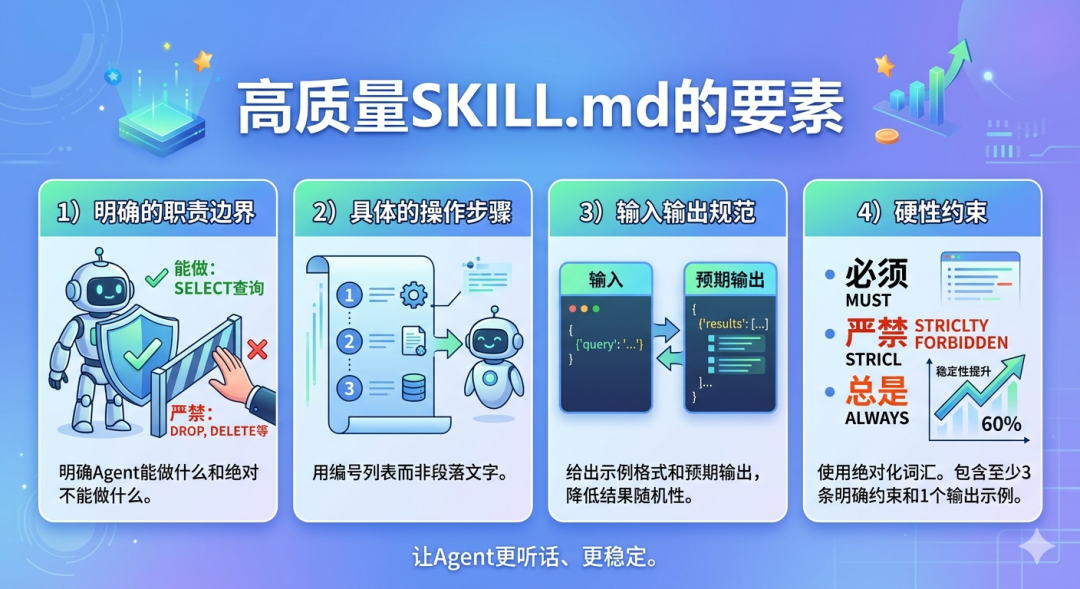
1) clear boundaries of responsibility: tell the Agent what it can do and what it absolutely can not do. the SQL analysis skill should be explicitly limited to only execute SELECT queries, prohibit DROP, DELETE and other dangerous operations.
2) Specific steps: use numbered lists rather than paragraph text. the Agent follows structured content much more closely than narrative text.
3) Input and output specification: give example formats and expected outputs to significantly reduce the randomness of the results.
(4) Hard constraints: use absolute words such as ”must”, ”forbidden”, ”always”, etc.. It is found that the stability of results is improved by 60% for a skill that contains at least 3 explicit constraints and 1 output example.
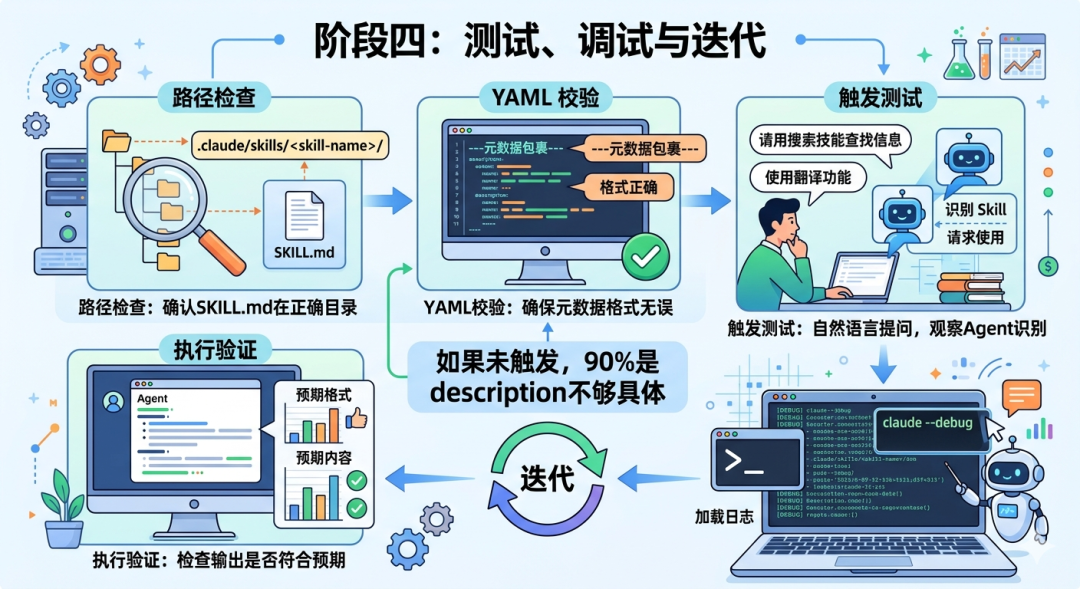
Phase 4: Testing, Debugging and Iteration
Verify as listed when creation is complete:
- Path check: make sure SKILL.md is in the correct directory (.claude/skills//)
- YAML checksum: ensure metadata is formatted correctly, - wrapped without errors
- Trigger test: ask a question in natural language to see if the Agent recognizes and requests the skill
- Perform validation: check that the output conforms to the expected format and content
If the SKILL is not triggered, 90% is a case of the description not being written specifically enough. You can run claude -debug to see the detailed load log when debugging.
More important than ”understanding” is doing it. Try to write your first .skill, so that repetitive tasks, familiar processes, and your own experience can become reusable capabilities.
The moment a SKILL is made, much of the understanding about Agents and Skills becomes clear.