
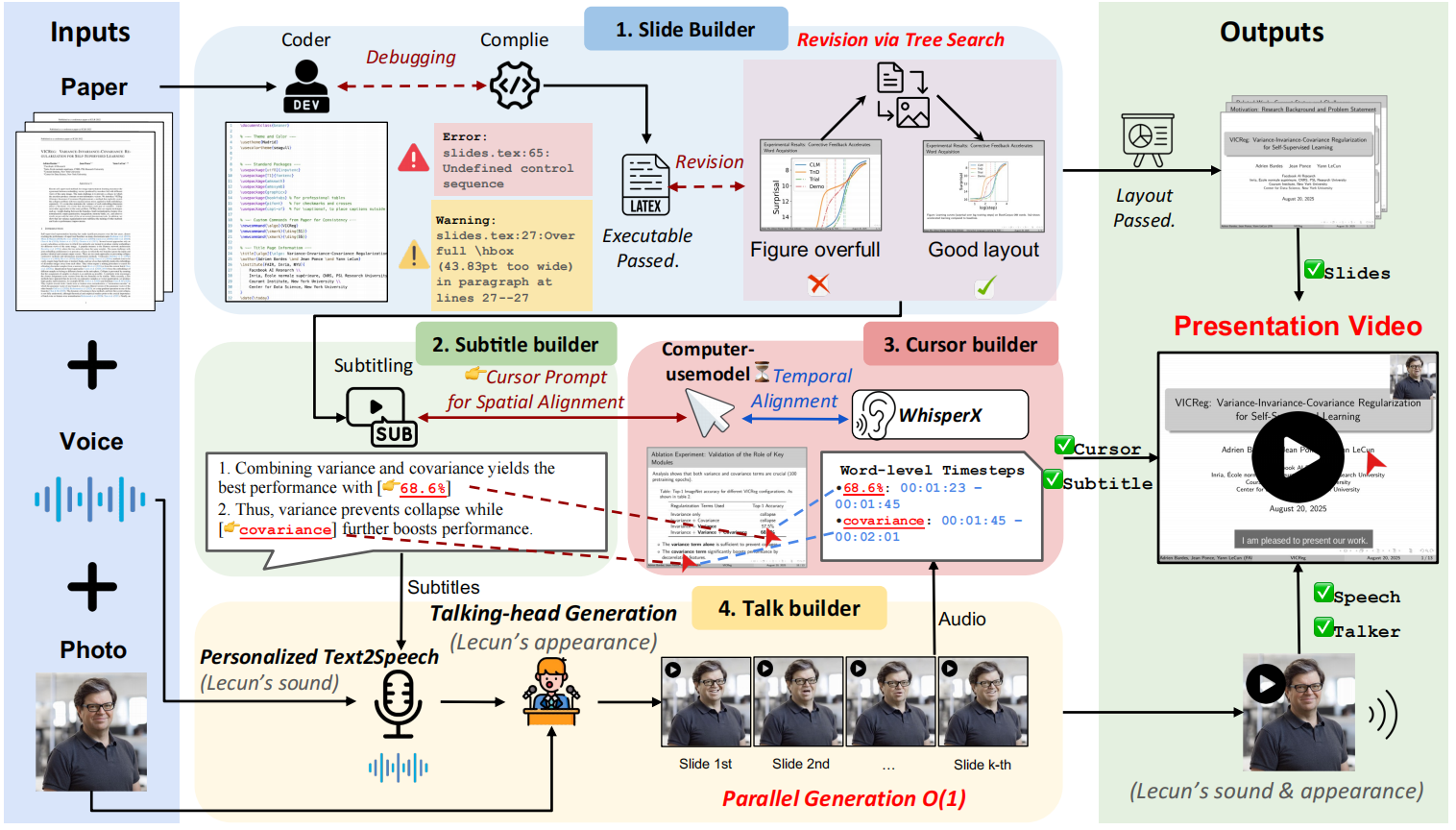
Paper2Video is an open source project that aims to free researchers from the drudgery of preparing videos of academic presentations. The core of the project is a multi-intelligence framework called PaperTalker, which can receive a paper written in LaTeX, a reference picture of the speaker and a reference audio, and then fully automated to generate a complete video of the presentation. PaperTalker automates the entire process from content extraction, slide (Slides) creation, caption generation, speech synthesis, mouse tracking, to rendering of the virtual digital human lecture video. In order to scientifically evaluate the quality of the generated video, the project also proposes a benchmark called Paper2Video, which contains 101 papers and the corresponding videos of the authors' speeches, and designs several evaluation dimensions to measure whether the video can accurately convey the information of the paper.
Function List
- Multi-Intelligence Collaboration: Use multiple intelligences, including slide generators and subtitle generators, to divide the work and accomplish complex video generation tasks.
- Automated Slide Generation: Extracts core content directly from LaTeX paper source code, automatically generates slides for presentations, and optimizes layout through compilation feedback.
- Speech and Subtitle Synthesis: Generate corresponding presentations based on slide content, synthesize audio using text-to-speech (TTS) technology, and generate subtitles with precisely aligned timestamps.
- Mouse track simulation: Analyzes presentation content and slide elements to automatically generate mouse movements and click trajectories that mimic those of real people and are used to guide the audience's attention during the presentation.
- Virtual digital person generation: With just a front view photo of the speaker, a virtual digital person (Talking Head) can be generated to deliver a speech in the video, making the video more expressive.
- parallel processing: Parallel processing of generation tasks related to each slide page (e.g., voice, mouse track, etc.) to dramatically improve the efficiency of video generation.
- Two generation modes: A full mode with VMs and a fast mode without VMs are available, so users can choose according to their needs.
Using Help
Paper2Video provides an automated pipeline to synthesize LaTeX-formatted paper projects, speaker images, and audio samples into a complete academic lecture video.
1. Environmental preparation
Before you start, you need to prepare the environment for the project to run. It is recommended to create a separate Python environment using Conda to avoid package version conflicts.
Primary environment installation:
First, clone the project code and go to src directory, then create and activate the Conda environment.
git clone https://github.com/showlab/Paper2Video.git
cd Paper2Video/src
conda create -n p2v python=3.10
conda activate p2v
Next, install all the necessary Python dependencies and the LaTeX compiler tectonic。
pip install -r requirements.txt
conda install -c conda-forge tectonic
Virtual Digitizer environment installation (optional):
If you do not need to generate a video of the Virtual Digitizer presentation (i.e., run the quick version), you can skip this step. Virtual Digital Man Functionality Dependencies Hallo2 project, a separate environment needs to be created for it.
# 在 Paper2Video 项目根目录下
git clone https://github.com/fudan-generative-vision/hallo2.git
cd hallo2
conda create -n hallo python=3.10
conda activate hallo
pip install -r requirements.txt
Once the installation is complete, you need to make a note of this hallo The path to the Python interpreter for your environment, which will be used for subsequent runs. You can find the path with the following command:
which python
2. Configuring the Large Language Model (LLM)
Paper2Video's ability to understand and generate content relies on a powerful large language model. You need to configure your API key. The project recommends using GPT-4.1 或 Gemini 2.5-Pro for best results.
Export your API key as an environment variable in the terminal:
export GEMINI_API_KEY="你的Gemini密钥"
export OPENAI_API_KEY="你的OpenAI密钥"
3. Implementation of video generation
Paper2Video provides two main execution scripts:pipeline_light.py for rapid generation (without virtual digital man).pipeline.py Used to generate a full version of a video containing a virtual digital person.
Minimum Hardware Requirements: An NVIDIA A6000 GPU with at least 48GB of video memory is recommended to run this process.
Fast mode (without virtual digital man)
This mode skips the time-consuming step of rendering a virtual digital person and quickly generates a slideshow video with voiceover, subtitles, and mouse track.
Execute the following command:
python pipeline_light.py \
--model_name_t gpt-4.1 \
--model_name_v gpt-4.1 \
--result_dir /path/to/output \
--paper_latex_root /path/to/latex_proj \
--ref_img /path/to/ref_img.png \
--ref_audio /path/to/ref_audio.wav \
--gpu_list [0,1,2,3,4,5,6,7]
Full mode (with virtual digital man)
This mode performs all the steps to generate a complete video with the speaker's screen.
Execute the following command:
python pipeline.py \
--model_name_t gpt-4.1 \
--model_name_v gpt-4.1 \
--model_name_talking hallo2 \
--result_dir /path/to/output \
--paper_latex_root /path/to/latex_proj \
--ref_img /path/to/ref_img.png \
--ref_audio /path/to/ref_audio.wav \
--talking_head_env /path/to/hallo2_env \
--gpu_list [0,1,2,3,4,5,6,7]
Parameter description
model_name_t: the name of the large language model used to process text tasks, e.g.gpt-4.1。result_dir: Save directory for output results, including generated slides, videos, etc.paper_latex_root: Your LaTeX thesis project root directory.ref_img: A reference picture of the speaker, which must be a square portrait photograph.ref_audio: Reference audio of the speaker for cloning tones, a sample of about 10 seconds is recommended.talking_head_env: (Required for full mode only) Previously installedhallopath to the Python interpreter for your environment.gpu_list: A list of GPU devices used for parallel computing.
At the end of the run, you can specify the result_dir directory to find all intermediate files and the final generated video.
application scenario
- Reports of academic conferences
Researchers can utilize Paper2Video to quickly convert their papers into video presentations for online conference sharing or as conference submissions. This greatly saves time in manually creating slides and recording videos. - Dissemination of research results
Creating easy-to-understand videos of complex dissertation content and posting them on social media or video platforms can help research results reach a wider audience and increase academic impact. - Educational and curricular materials
Teachers and scholars can turn classic or up-to-date academic papers into instructional videos that can be used as course materials to help students understand cutting-edge science more intuitively. - Paper pre-presentation and rehearsal
Before formally defending or reporting offline, authors can use the tool to generate a preview video to check the logical flow, time control, and visuals of the report for optimization and iteration.
QA
- What core problem does this program address?
This project focuses on solving the time-consuming and labor-intensive problem of academic lecture video production. Traditionally, researchers spend a lot of time designing slides, writing lectures, recording and editing. paper2Video aims to free researchers from this tedious task by automating it. - What input files do I need to prepare to generate a video?
You will need to have three things on hand: a complete paper project written in LaTeX format, a square photo of the front of the speaker, and a reference recording of the speaker of about 10 seconds. - I don't know much about hardware requirements, can my regular computer run it?
The hardware requirements for this project are very high, especially the GPU. it is officially recommended to use at least an NVIDIA A6000 GPU with 48 GB of video memory. an ordinary PC or laptop will most likely not be able to run the complete generation process, especially the part that contains the rendering of the virtual digital person. - Can I use this tool if I don't want to show my face in the video?
Can. The program providespipeline_light.pyscript, it will run a fast mode that generates a video that contains all the core elements (slides, voiceover, subtitles, mouse track) but will not contain the virtual digitizer screen. This mode also requires relatively low computational resources.