



LittleCrawler is a modern social media data collection framework built on Python asynchronous programming techniques. It is designed for developers and data analysts who need to obtain public social media data, and is able to automate the collection of information from mainstream social platforms (currently supporting Xiaohongshu, Zhihu, and Idle Fish/Small Yellow Fish). Unlike traditional single-script crawlers, LittleCrawler provides a complete solution that not only supports fast execution of tasks via the command line (CLI), but also has a built-in web-visualized backend interface based on FastAPI and Next.js, which makes it easy for users to manage tasks and monitor runtime status via a graphical interface. The underlying Playwright browser automation technology supports CDP (Chrome DevTools Protocol) mode, which can effectively deal with complex anti-crawler detection and ensure the stability and success rate of data collection. Whether it is saved as a simple CSV/Excel table or deposited into MySQL/MongoDB databases, it can easily cope with the situation, and it is truly a one-stop service from collection to storage.
Function List
- Multi-platform support: Current core supportLittle Red Book (xhs)、Zhihu (zhihu) 和 Idle Fish (xhy/xy) Data collection on three platforms.
- Multiple acquisition modes:
- Search Capture: Batch crawl search results based on customized keywords (Keywords).
- Details Capture: Grab details and comments on specific articles, notes or products.
- Home Page Collection: Crawls all publicly available content from the homepage of a given Creator.
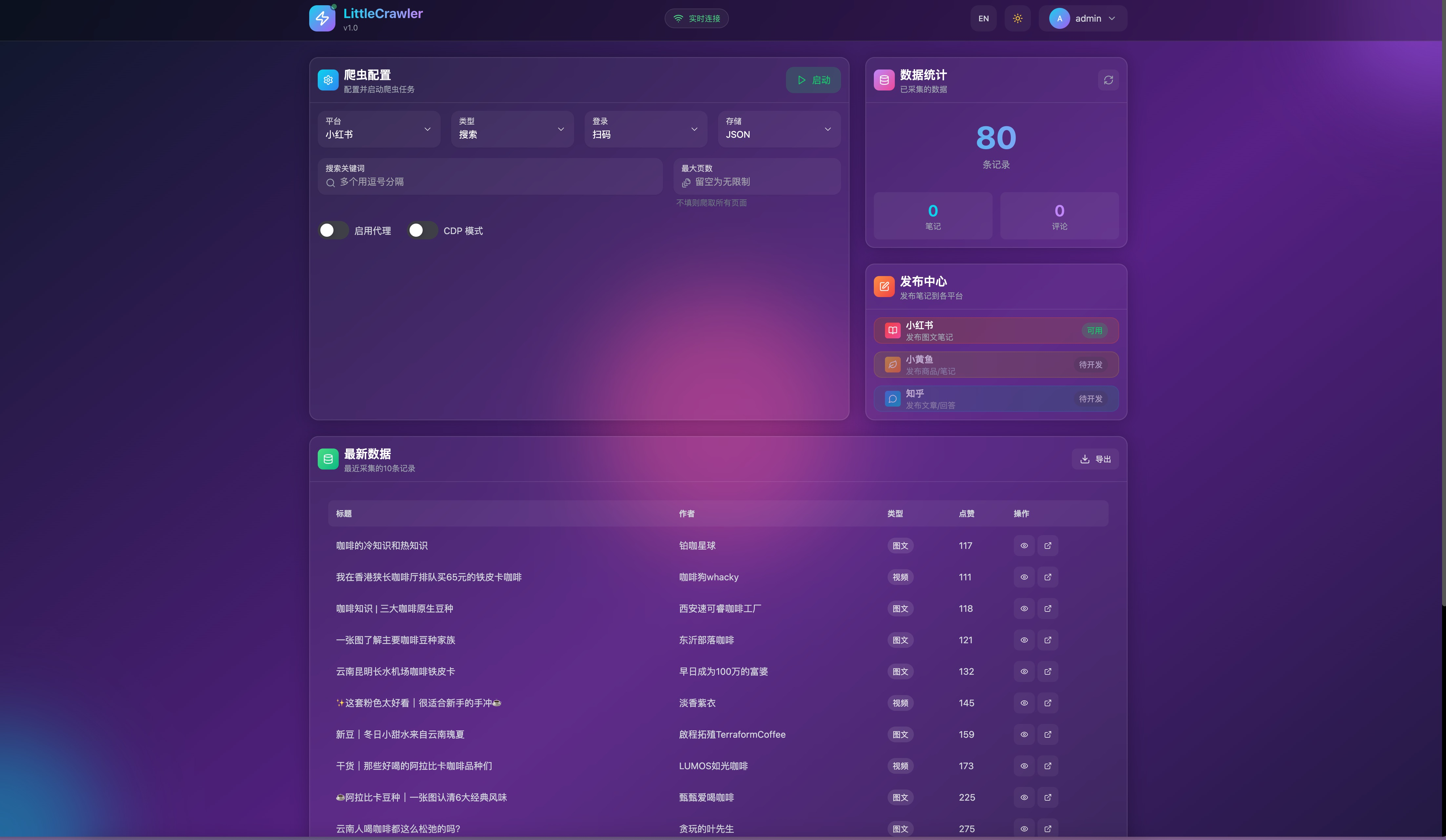
- Visual Web Backend: Provides a modern web dashboard that lowers the barriers to operation by allowing you to configure tasks, launch crawlers, and preview the status in real-time right in your browser.
- Flexible data storage: It supports saving the collected data into multiple formats, including local files (CSV, JSON, Excel) and databases (SQLite, MySQL, MongoDB), to meet the data processing needs of different scenarios.
- Strong anti-detection capabilities: Built-in CDP mode (Chrome DevTools Protocol), which simulates real user behavior and dramatically improves the probability of passing platform security detection.
- Multiple Login MethodsQRCode, CAPTCHA, and Cookie logins are supported for users to manage their account sessions.
- High Performance Architecture: based on Python 3.11+ and asynchronous IO design, with the
uvExtremely fast package management tool that runs efficiently and with a manageable resource footprint.
Using Help
LittleCrawler offers both command line (CLI) and web interface options. For the best experience, it is recommended that you have Python 3.11 or later installed on your computer.
1. Installation and environment configuration
First, you need to download the project code locally and install the dependencies. It is recommended to use the uv Perform dependency management (faster) and also use the standard pip。
Step 1: Get the code
Open a terminal or command prompt and execute the following command:
git clone https://github.com/pbeenig/LittleCrawler.git
cd LittleCrawler
Step 2: Install dependencies
utilization uv Installation (recommended):
uv sync
playwright install chromium
Or use pip Installation:
pip install -r requirements.txt
playwright install chromium
2. Command-line (CLI) operation
This is the quickest way to start collecting and is suitable for users who are used to using a terminal.
Configuration parameters
You can directly edit the config/base_config.py file to set the default parameters:
PLATFORM: Set the target platform, e.g."xhs"(Little Red Book),"zhihu"(Knowing).KEYWORDS: Set the search keywords, e.g."iphone16, 摄影技巧"。CRAWLER_TYPE: Set the type of collection, e.g."search"(Search),"detail"(Details).SAVE_DATA_OPTION: Set the save format, e.g."csv"或"excel"。
Start the crawler
Runs with the default configuration:
python main.py
Or run it with the parameters specified on the command line (overriding the default configuration):
# 示例:在小红书搜索关键词并采集
python main.py --platform xhs --type search
# 示例:初始化 SQLite 数据库
python main.py --init-db sqlite
3. Web visualization running in the background
If you prefer a graphical interface, you can launch the built-in web backend.
Step 1: Compile the front-end page
Go to the Web Catalog and build the interface resources (requires Node.js to be installed):
cd ./web
npm run build
Note: You can skip this step if you only want to run the backend API without the interface.
Step 2: Start the full service
Go back to the project root directory and start the backend service:
# 启动 API 和前端页面
uv run uvicorn api.main:app --port 8080 --reload
Step 3: Access the interface
Open your browser and visit http://127.0.0.1:8080. You will see a modernized console in which to work:
- Configuration tasks: Enter keywords, select platform and crawler mode in the interface.
- Swipe to log in: View the login QR code and scan it directly on the webpage.
- monitoring state: Real-time view of the running log of the crawler and the progress of the collection.
- Preview data: Partial support for direct preview of collected data results.
Frequently Asked Questions and Maintenance
- Clearing the cache: If you encounter a runtime error, try cleaning up temporary files.
# 清除缓存命令 find . -type d -name "__pycache__" -exec rm -rf {} + - Data export: After the collection is complete, the data will be saved by default in the
data/directory, the file name usually contains a timestamp for easy archive management.
application scenario
- E-commerce market research
By capturing prices and descriptions of second-hand goods on Idle Fish (Xiaoyuangyu), we analyze the secondary market conditions and value retention rates of specific products (e.g., electronics, luxury goods) to assist in pricing decisions. - Social Media Content Analysis
Operators can capture popular notes, comments, and blogger information on Little Red Book to analyze keywords, topic trends, and user preferences for pop-up content to optimize their content creation strategy. - Academic Research and Public Opinion Monitoring
Researchers can use the tool to crawl Q&As and articles on Zhihu to collect public opinions and discussions on specific social topics or tech products for Natural Language Processing (NLP) corpus construction or public opinion analysis. - Competitor Monitoring
Brands can regularly capture user feedback and activity information of competitors on major social platforms to keep abreast of competitors' dynamics and market reactions.
QA
- What operating systems does this tool support?
Windows, macOS, and Linux are supported, and thanks to Playwright, any system that can run the Chromium browser is theoretically supported. - What should I do if I encounter anti-climbing validation (e.g. slider captcha)?
The tool has a built-in CDP mode, which can simulate real browser fingerprints and reduce the probability of triggering authentication. However, in high-frequency acquisition, it is still possible to trigger verification, so it is recommended to appropriately reduce the acquisition frequency or configure the proxy IP (set it in the configuration file).ENABLE_IP_PROXY = True)。 - Can the collected data be saved to my own database?
It is possible. In the configuration file set theSAVE_DATA_OPTIONset tomysql或mongodband just fill in your database connection information (address, account number, password) in the corresponding configuration paragraph. - Why is the installation prompted by a missing
uv?
uvis an up-and-coming Python package management tool; if you don't have it installed, you can use thepip install uvPerform the installation, or just skip theuvcommand, using the standardpip和pythoncommand instead.


























