


Antigravity-Manager is a desktop tool. It helps users to manage multiple AI accounts. Users can easily switch accounts. The tool supports models such as Gemini and Claude. The core is to provide a local API staging area. Users don't have to worry about account limits. Tool is built with Tauri v2 and React. Based on Rust language. Stable operation. Simple interface. Support multi-language. Users can monitor the account status. Tools are free to download. Suitable for developers. Easy to install. Supports multiple operating systems. Data is stored locally. Safe and reliable. The latest version is v3.3.49. Fixed many problems. Better performance. Active community. 16.5k stars. positive user feedback.
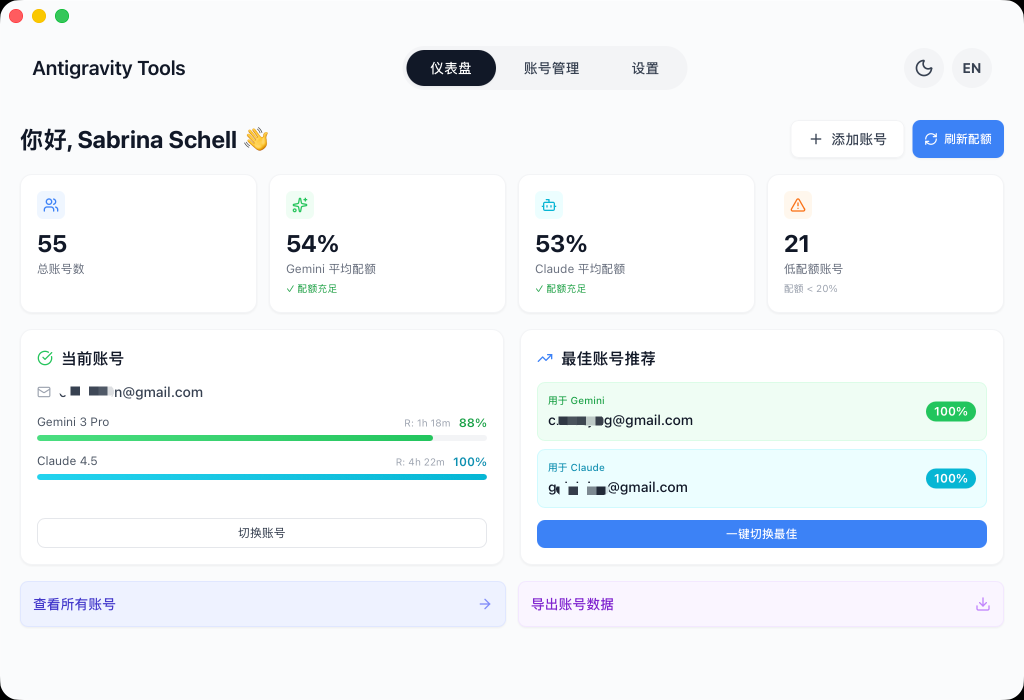
Function List
- Smart Account Dashboard: view account health in real time. Show quota percentages. Recommend the best account. One-click switching.
- Account Manager: Authorized with OAuth 2.0. Support batch import Token. old database migration. List and grid view. Automatically mark blocked accounts.
- Protocol conversion and relaying: Support OpenAI, Anthropic, Gemini protocols. Automatic error handling. Retry and rotate accounts. Allow large Payload transfer.
- Model Routing Center: maps model IDs to families. Custom regular expressions. Prioritization based on account type. Backend tasks relegated to Flash models.
- Multimodal with Imagen 3 support: mapping size parameter to specification. Customize aspect ratio. quality parameter to resolution. Generate HD images.
Using Help
Antigravity-Manager is easy to install. Support multiple ways. Suitable for different systems. Let's start with macOS and Linux terminal installation. Open the terminal. Enter the commandbrew tap lbjlaq/antigravity-manager https://github.com/lbjlaq/Antigravity-Manager. Then runbrew install --cask antigravity-toolsmacOS users plus--no-quarantineAvoid the permissions prompt.Linux will automatically set permissions. Installation is complete. The tool is ready.
Downloading manually is fine. Go to the GitHub Releases page. Look for the corresponding system file. macOS .dmg, Windows .msi or .zip, Linux .deb or AppImage. download it. Double-click to install. Follow the prompts. It will take a few minutes.
Arch Linux users. One-Click Installation. Installation withcurl -sSL https://raw.githubusercontent.com/lbjlaq/Antigravity-Manager/main/deploy/arch/install.sh | bash. Scripts are handled automatically.
Remote server deployment. For Headless Linux.curl -fsSL https://raw.githubusercontent.com/lbjlaq/Antigravity-Manager/main/deploy/headless-xvfb/install.sh | sudo bash. Suitable for GUI-less environments.
Docker deployment is recommended for NAS or servers. Go to the deploy/docker directory. Rundocker compose up -d. Accesshttp://localhost:6080/vnc_lite.htmlThe password is password. The password is password. memory is at least 512MB. 2GB is recommended. set shm_size to 2gb.
After installation. Open the tool. The interface has dashboard, account list, API reverse generation, settings and so on. Toggle dark or light color mode. Select language such as Chinese, English.
Add an account. First, go to the “Accounts” page. Click “Add Account”. Select “OAuth”. The tool generates a link. Copy it to your browser. Complete the authorization. Auto-save after callback. You can also add the token manually. Single entry or JSON batch. Older database hot migration support.
Monitor accounts. See real-time status in dashboard. gemini pro, flash, claude, drawing, etc. Quota percentage display. Synchronization time log. Algorithms recommend the best accounts. One-click switching with.
Use the API proxy. Tool provides local transit. Three protocols are supported. Let the Base URL behttp://127.0.0.1:8045. Handles error 429 or 401. Automatic retry. Rotate accounts.Payload up to 100MB.Suitable for HD image recognition.
Model Routing. Mapping complex IDs to simple families. Customized regular redirection. Sorting based on Ultra/Pro/Free types. Quota reset frequency consideration. Background tasks automatically downgrade to Flash. resource saving.
Multimodal function. Generate an image with Imagen 3. Use Imagen 3, map size like “1920×1080”. Automatically calculate aspect ratio. select hd/medium/standard for quality. convert to 4K/2K/standard.
Python access example. Install the openai library. Code like this: import openai. client = openai.OpenAI(api_key=”sk-antigravity”, base_url=”http://127.0.0.1. 8045/v1″). response = client.chat.completions.create(model=”gemini-3-flash”, messages=[{“role ”: “user”, “content”: “Hello, please introduce yourself”}]). print( response.choices[0].messages.content). Simple chat.
Image generation. response = client.images.generate(model=”gemini-3-pro-image”, prompt=”A futuristic city ”, size=”1920×1080″, quality=”hd”). The tool handles the mapping.
Claude Code CLI access. Set the environment variable. export ANTHROPIC_API_KEY=”sk-antigravity”. export ANTHROPIC_BASE_URL=”http://127.0.0.1:8045 ″. Run claude. implement networking search.
Kilo Code access. Select the Gemini protocol. base URL as above. Customize the model mapping. Resolve name inconsistencies.
Cherry Studio integration. Using OpenAI protocol. Access to Imagen 3 drawing. Setup is similar.
Update tool. gitHub Releases check for new versions. Download and install. v3.3.49 Fix breaks, 0 Token defense. Optimization settings take effect. Refactor backend. Add API monitoring. Sift logs by account.
Data Security. Account encryption stored in SQLite. not away from the device. License CC BY-NC-SA 4.0. non-commercial use.
Community Support. There are discounts for sponsoring PackyCode. Reward Paypal, WeChat, Buy Me a Coffee.
Operate the process. Launch the tool. Add account. Monitor the dashboard. Set up API proxy. Access the client. Run tasks. Automate tool scheduling. Self-healing from errors. Easy for users to get started.
application scenario
- Developer Multi-Account Management
Developers have multiple Gemini or Claude accounts. Tools help switch. Avoid manual logins. Keep the workflow smooth. - API Integration Development
Build local AI staging. Access Python or CLI tools. Test models. Handle large file transfers. Develop efficiently. - Image Generation Tasks
Generate high resolution images with Imagen 3. Customized resolution. Integration into Studio. suitable for designers to iterate quickly. - Server deployment
NAS or cloud server running tools. Multiple shared accounts. docker containerization. Easy to maintain. - Learning AI Tools
Newbies monitor account status. Learn protocol conversion. Practice routing configuration. Getting Started Friendly.
QA
- What operating systems are supported by the tool?
Supports macOS, Windows, Linux. includes Arch and Headless modes. - How do I handle account bans?
Automatically mark 403 accounts. Skip use. Dashboard display. - Do I have to pay for it?
Free. Open source. Non-commercial license. - What about data security?
Local encrypted storage. Not uploaded to the cloud. - How do I update my version?
Go to GitHub Releases and download the latest. Install the overlay.


























