
Upstash RAG The Chat Component is a React component designed for Next.js applications to provide an AI chat interface based on RAG (Retrieval Augmented Generation) technology. The component combines Upstash Vector for similarity search, Together AI for Large Language Modeling (LLM), and Vercel AI SDK for streaming responses. With this component, developers can easily integrate powerful chat functionality into their applications, supporting real-time contextual search and persistent chat transcripts.
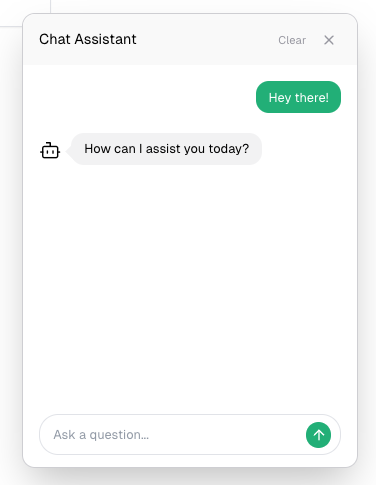
Function List
- Streaming Response Support: Provide instant chat response to enhance the user experience.
- Server Operation: Supports server-side execution of operations to ensure data security and performance.
- responsive design: Adapt to a variety of devices to provide a consistent user experience.
- Real-time contextual search: Retrieve relevant information in real time based on user input and provide accurate answers.
- Persistent Chat Records: Supports persistent storage of chat logs, making it easy for users to view historical conversations.
- Fully customizable UI components: Developers can customize the appearance and functionality of the chat interface according to their needs.
- Dark/Bright Mode Support: Adapt to the user's visual preferences and provide a comfortable experience.
Using Help
Installation process
- Installation with npm:
npm install @upstash/rag-chat-component
- Installation with pnpm:
pnpm add @upstash/rag-chat-component
- Installation with yarn:
yarn add @upstash/rag-chat-component
Configuring Environment Variables
The following environment variables need to be configured before using the component:
UPSTASH_VECTOR_REST_URL=
UPSTASH_VECTOR_REST_TOKEN=
OPENAI_API_KEY=
TOGETHER_API_KEY=
If you need to persist the chat logs, you will also need to configure them:
UPSTASH_REDIS_REST_URL=
UPSTASH_REDIS_REST_TOKEN=
Configuration Style
在tailwind.config.tsfile to add the following configuration:
import type { Config } from "tailwindcss";
export default {
content: ["./node_modules/@upstash/rag-chat-component/**/*.{js,mjs}"],
} satisfies Config;
Implementing the Chat Component
There are two ways to integrate RAG Chat Component into your application:
- Use of stand-alone component files (recommended): Create a separate component file and use it in the application:
   // components/chat.tsx
"use client";
import { ChatComponent } from "@upstash/rag-chat-component";
export const Chat = () => {
return <ChatComponent />;
};
// page.tsx
import { Chat } from "./components/chat";
export default function Home() {
return (
<>
<Chat />
<p>Home</p>
</>
);
}
- Integration directly in client components: Import and use ChatComponent directly in the client page:
   // page.tsx
"use client";
import { ChatComponent } from "@upstash/rag-chat-component";
export default function Home() {
return (
<>
<ChatComponent />
<p>Home</p>
</>
);
}
usage example
Below is a simple example of how to use it:
import { ChatComponent } from "@upstash/rag-chat-component";
export default function App() {
return (
<div>
<h1>Welcome to RAG Chat</h1>
<ChatComponent />
</div>
);
}
With the above steps, you can easily integrate and use Upstash RAG Chat Component in your Next.js application to provide powerful AI chat functionality.