General Introduction
Taskek is an AI-powered productivity tool with integrated Trello, Google Docs and Miro functionality for all types of work environments, from high-rise buildings to home offices. It allows teams to start with simple drawings that quickly translate into specific tasks, providing a unique and efficient way to collaborate. In the future, Taskek even plans to have AI directly help with certain tasks to further increase productivity.

Function List
-
Task switching: Easily transformed from sketches or ideas into concrete task lists.
-
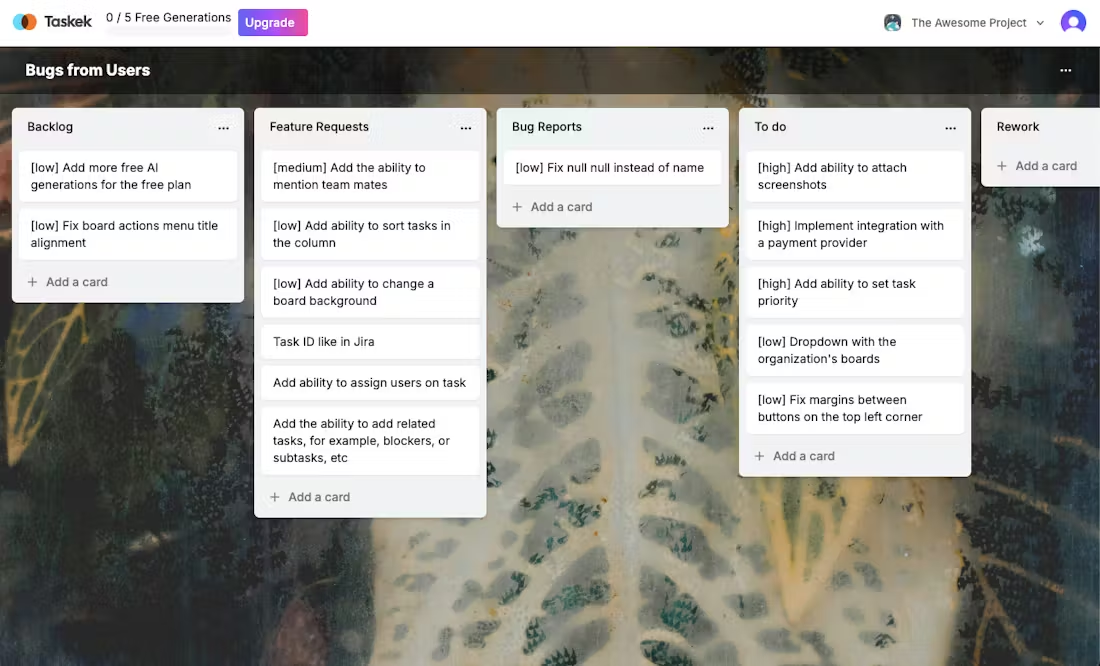
project management: Provides Trello-like Kanban functionality with support for multiple project views.
-
Document Collaboration: Edit and share documents in real time, as easily as Google Docs.
-
Creative Collaboration: Miro-like whiteboard functionality that supports team brainstorming online.
-
AI Smart Advice: AI provides task optimization suggestions and may solve some tasks directly in the future.
Using Help
Installation and Login
As a web-based tool, Taskek does not require complicated installation steps:
-
Access to the website: Navigate toTaskek official website。
-
register an account: Click on the Register button to create a new account with an email and password. If you have an account, log in directly.
-
Verify Account: After registering, log in to your email address to confirm your account activation.
Basic Operation Guide
-
Create a project:
-
After logging in, click "New Project" to name your project.
-
Select the appropriate type of project (e.g., task management, document collaboration, etc.) and begin your work.
-
-
task management:
-
In the Project screen, select Kanban or List view.
-
Add Tasks: Click on "+ Add Task" and enter title, description, deadline, etc.
-
task sth.: Drag and drop the task to the specified member column, or assign it directly in the task details.
-
Monitoring Progress: Keep task progress transparent through comments and real-time updates.
-
-
Document Collaboration:
-
Go to the Documents section to create or edit a shared document.
-
Real-time collaboration: team members can edit the same document at the same time.
-
Version Control: Retain document history versions for easy backtracking and modification.
-
-
Creative Collaboration:
-
Use the "whiteboard" feature for team brainstorming.
-
Add notes, graphics, and images to visualize ideas.
-
Export or share whiteboard content to maintain a common team understanding of ideas.
-
-
AI function:
-
In Task Management, click "AI Suggestions" to get suggestions for task optimization.
-
Future updates may include the ability for AI to directly solve or assist with tasks.
-
Advanced Usage Tips
-
Customized WorkflowCustomize Kanban columns according to project needs, such as "In Development", "Testing", "Release".
-
Integration of external tools: Utilize APIs or plugins to connect Taskek to other tools (e.g. Slack, Zoom) for a seamless workflow.
-
Statistics and analysis: Analyze team productivity and project progress using Taskek's reporting tools to provide data-supported decision making.
With these steps and tips, users can take full advantage of Taskek's features to improve team collaboration and move seamlessly from idea to execution.