
MonkeyCode AI is an enterprise-level AI software development and R&D collaboration platform crafted by well-known security vendor Changting Technology. Unlike plug-ins on the market that only provide code completion, MonkeyCode is committed to reshaping the entire software engineering workflow, so that AI can truly become an “engineering partner” involved in the entire chain of requirements analysis, architectural design, code development and automated code review (Code Review). The platform has a unique built-in SDD (specification-driven development) concept, forcing AI to sort out the specification before writing code, and eliminating “making things up”. Meanwhile, in order to meet the stringent security requirements of the enterprise level, MonkeyCode adopts a sandbox-level cloud security isolation environment, where all AI operations are carried out in a standalone virtual machine that is ready to be burned after reading, and supports 100% pure intranet private one-click deployment, completely eliminating the risk of leaking core code. It deeply integrates with mainstream Git platforms and is compatible with top domestic and international language models, fully empowering individual developers and demanding R&D teams.
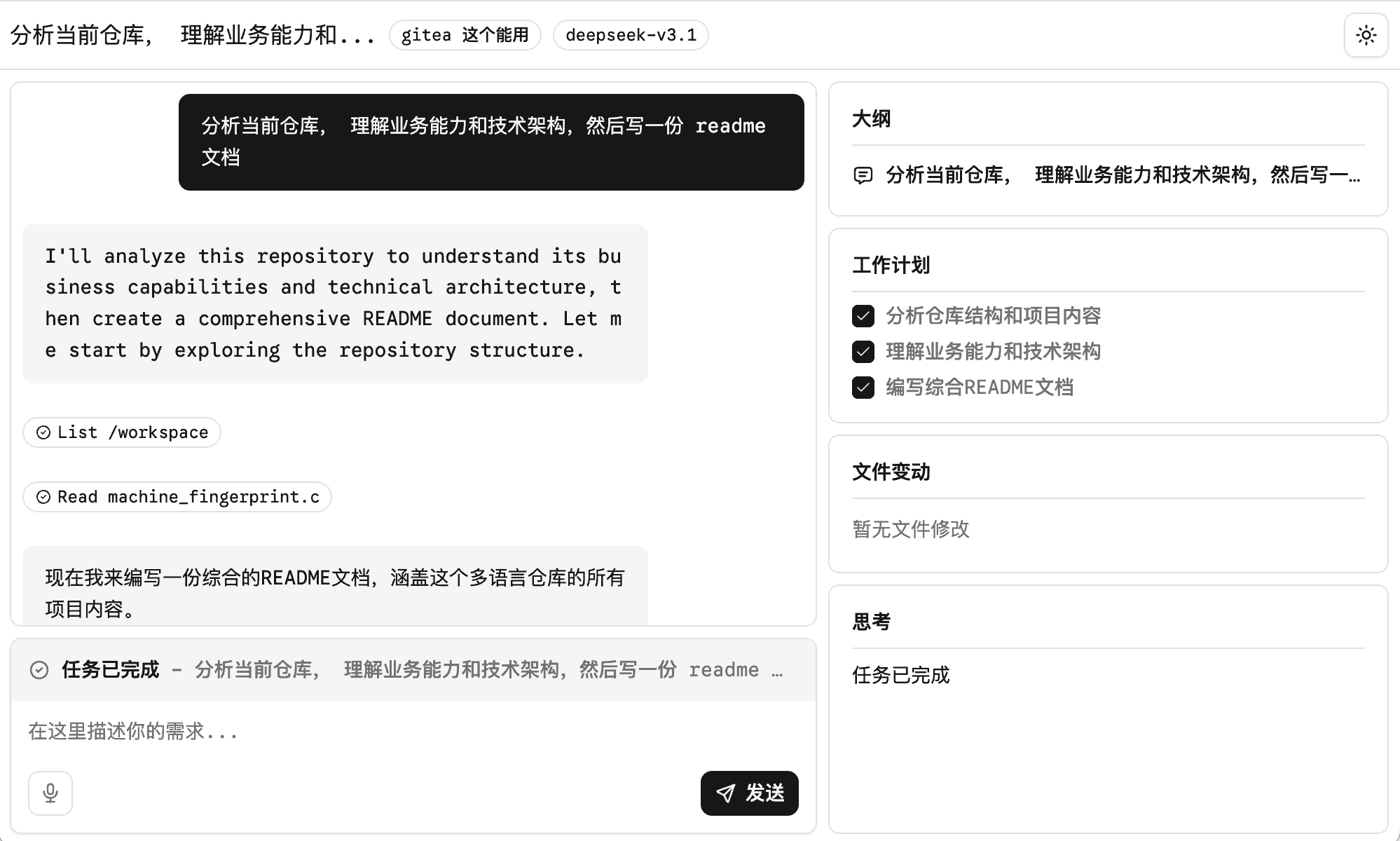
new version
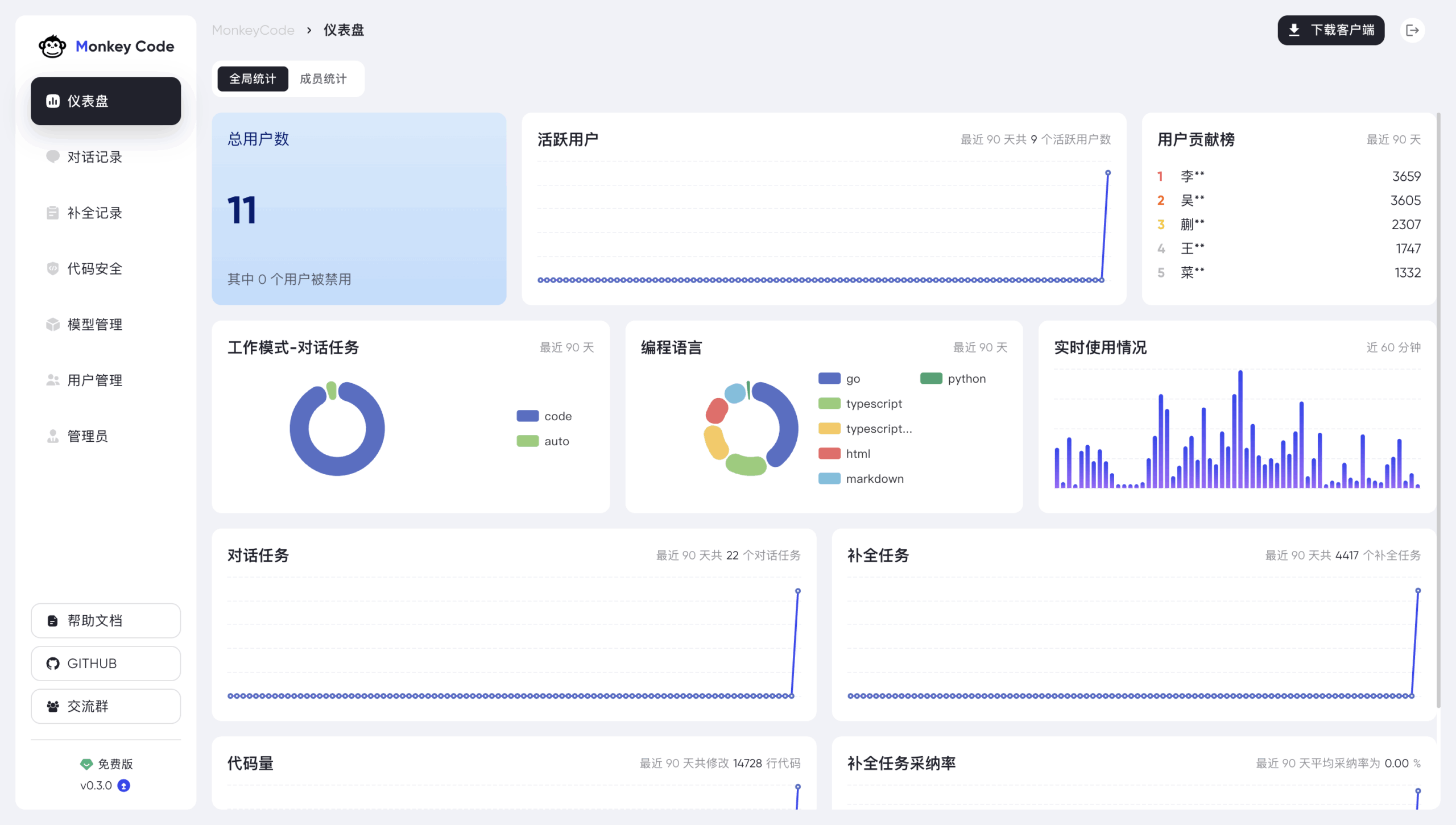
Older versions: based on Roo Code Development.
Function List
- Natural Language Intelligence Development TasksAI will automatically take over and complete the whole process from technology selection, architecture design to final code landing.
- Built-in SDD specification-driven workflowThe first is to break the chaos of traditional big models spitting out code directly, and to force AI to follow the engineering standard of first disassembling the original requirements, formulating product design and technical solutions, and then generating executable code.
- Sandboxed, cloud-isolated development environment: Every time you execute a code task, the system automatically creates an independent virtual machine sandbox, providing multi-language highlighting online IDE, multi-session Web terminal and file management functions, and destroying the environment immediately after the task is finished, ensuring absolute data security.
- Deep integration with the mainstream Git collaboration ecosystem: Native support for seamlessly interfacing with GitHub, GitLab, and Gitee eliminates the need for developers to jump out of their usual workbenches and into the comments section of an Issue or PR.
@MonkeyCode-AIThe AI response is triggered. - Fully automated intelligent code review (Code Review)Git Bot: Configured as a Git bot, it automatically reviews PR/MR submissions from team members for syntax detection, performance optimization analysis, and in-depth blocking of potential security vulnerabilities.
- Domestic and international mainstream big model free switchingThe platform is compatible with and supports switching between the top domestic and international language models, including DeepSeek, Kimi, Qwen, Claude, Codex, etc., and adapting to different complex scenarios.
- 100% private and offline deployment capabilityIt supports one-click Docker containerized local deployment, allowing enterprises to run large models and project data in a pure intranet environment with no extranet, meeting the highest compliance requirements at the financial and governmental levels.
- Enterprise-level team and resource rights managementThe company provides professional-grade data dashboards and management panels that enable enterprise administrators to manage member permissions at a granular level, review real-time audit logs, and unify the allocation of hosting, mirroring, and AI modeling power resources.
Using Help
Welcome MonkeyCode AIMonkeyCode is an enterprise-level AI programming assistance platform created by Changting Technology! As an enterprise-level AI programming assistance platform built by Changting Technology, MonkeyCode breaks the limitations of traditional AI, which can only do code fragment completion, and allows AI to truly participate in the full life cycle of project development. This guide will provide you with a detailed introduction on how to configure and use all the core functions of the platform from scratch. Whether you are an independent developer, R&D team manager, or a private enterprise user in pursuit of absolute data security, you can find a nanny-level operation process here.
🚀 Mode 1: Online cloud SaaS version (suitable for individual quick experience and team agile development)
For those who don't want to compromise their local environment, the fastest way to use the online cloud platform is to visit the MonkeyCode website directly.
1. Sign up and receive free arithmetic benefits
- Visit the official website: Open the URL in your browser
https://monkeycode-ai.com/。 - Authorized Login: Click the Login button, we recommend using “Bai Zhi Yun account” or other platform supported third-party account to directly authorize the login.
- Checking the math.During the official promotional period, a generous initial credit (usually about 20,000 points, equivalent to 200 RMB) will be issued automatically to newly registered users after they log in. You can check your balance in the “Account Center” at the bottom left corner of the console, which is enough for you to rent a high-level cloud development machine and run several real-life complete project tests with the smartest big models available.
2. Launch your first “smart development task”
MonkeyCode's best feature is the built-in SDD (Specification Driven Development) Workflows to ensure that AI writes code that is highly engineered and has high reliability.
- New tasks: Enter the [Smart Tasks] module and click “New Development Task”.
- Description of Requirements: In the dialog box, enter your requirements in detail in natural language. For example:“Develop a back-end interface for user's mobile number verification code login using Python FastAPI framework and interfacing to MySQL database, required to include complete error handling mechanism.”
- Selection of environment and model: In the right panel, select the large language model you are accustomed to (e.g., the domestic cost-effective DeepSeek, Kimi, or overseas). Claude etc.) and select the desired development image.
- Enforcement of normative dismantling: After clicking Run, the AI will not (act, happen etc)Write code immediately. It starts with “product design” and “technical solution design” and generates a well-reasoned requirements decomposition document.
- Manual validation and development: You review the technical solution generated by the AI to make sure it's correct or to fine-tune it manually, and then click Start Development. At this point, the AI will automatically create aSeparate virtual machine sandboxIt automatically installs underlying dependencies, writes code, and even runs test scripts in a sandbox, fully visualized, without ever disrupting your local computer environment.
3. Using online Web IDEs and cloud environments
- When the development task is in progress or completed, you can enter the [Online Development Environment] to take over the progress at any time.
- Interface Distribution: On the left isfile manager(you can browse, upload, and download your core code files online); the center is supported by multilingual syntax highlightingOnline IDE Core EditorThe experience is comparable to that of the native desktop version of VS Code; below that is theMulti-session web terminalThe following is an example of a Linux command that can be executed directly.
- One-click preview: If you are developing a front-end or full-stack web project, simply run the project's startup command in the terminal (e.g.
npm run dev), click the “Online Preview” button at the top of the interface, the system will automatically map a temporary access link to the public network for you, so that you can directly test the interactive effect of the interface.
🤖 Model 2: Fully Automated Git Robot Integration (for R&D teams collaborating with existing specifications)
MonkeyCode can seamlessly drop into your existing R&D processes and work directly for you in your code repositories, with full support for GitHub, GitLab, and Gitee platforms.
1. Generate and bind access tokens (GitLab as an example)
- Log in to your GitLab, go to the project settings page, and click the
设置->访问令牌。 - Create a new project token (suggested name is
monkeycode-ai-bot(to differentiate), check the "Developer" role, and open theapi,read_repository,write_repositoryThree scope permissions, copying the generated Token string and keep it safe. - Go back to MonkeyCode console, enter [Team Collaboration] or [AI Staff Management] module, click "New AI Staff", fill in your Git repository address, and paste the Token you just copied to complete the account binding.
2. Configure Webhook to realize two-way real-time linkage
- After successfully creating an AI employee on the MonkeyCode side, the system provides you with a set of Webhook URLs and an exclusive Secret.
- Return to the GitLab project's
设置->Webhookpage, fill in the URL and Secret in the corresponding places. In the Trigger Event checkbox, be sure to check “Comments” and “Merge Requests” and click Save. The bot is now in your codebase and ready to go.
3. Scene operation process
- Issue Driving Automated Development: Document the feature request in a new Issue in your Git repository. Tweet about it in the body of the description:
@monkeycode-ai-bot 请帮我实现这个 Issue 描述的功能逻辑AI automatically reads the analytics context, writes the code in the background, and proactively submits a Pull Request (PR) with the complete updated code for your project within minutes. - Intelligent Code Review: When a team member finishes writing code and submits a new PR/MR, you, as the supervisor, simply leave a message in the comments section!
@monkeycode-ai-bot 请对本次提交的代码进行全量审查,找出潜在的性能瓶颈与安全漏洞The AI robot responds immediately, scans and analyzes each line of code, and gives professional modification and optimization suggestions directly next to the code in the form of Inline Comments, greatly reducing the pressure of manual review.
🔒 Model 3: Enterprise-grade purely private local deployment (for organizations with extremely high code privacy and security requirements)
If your financial, government, or large Internet enterprise strictly prohibits any code data from leaving the intranet, MonkeyCode offers an extremely user-friendly private deployment solution.
1. Preparing the server environment
- A server with a regular Linux operating system (such as Ubuntu 20.04+ or CentOS 7+) is recommended.
- Ensure that the server has a Docker and Docker Compose environment installed to guarantee the smooth operation of containerized one-click deployments.
2. Run the one-click installation script
- utilization
rootPrivilege to log in to your Linux server command line terminal. - Run the official quick install instructions provided:
curl -sSL https://install.monkeycode.baizhi.cloud | bash - The script automatically pulls the required individual container images and completes the configuration of front- and back-end services and database linkage. At the end of the installation process, the terminal console clearly prints out the address of the local management panel (usually something like
http://您服务器的IP:8080format), and the initial administrator account and password generated for you by the system (if you accidentally forget them, you can always find them in the installation directory of the.env(retrieved in the file).
3. Configuration privatization model and in-house team management
- Model Private AccessLogin to your locally built backend with an administrator account and enter the [Model Management] menu. You can fill in the API Key of the centrally purchased commercial big models of your enterprise, and more importantly, you can directly point the interface to the open source big models (such as Qwen-Coder, Llama series, etc.) deployed locally in your enterprise intranet to achieve real physical isolation.
- Resource allocation and teamworkIn the [Team Management] module, administrators can batch import the accounts of R&D members within the enterprise, and allocate cloud host resources and model arithmetic calling quotas for developers in different positions on demand. All R&D data interactions are locked in the enterprise's self-built server room, so that the business code 100% is retained in the intranet, leak-proof and more compliant.
💡 Core Advancement Tip: How to Use Prompts to Energize the Strongest Ability?
When using MonkeyCode for task development, the“Think of AI as a new coworker just starting out.” This is the key to improving the success of your communication. Try to use structured prompts in your “smart task” requirement descriptions. For example, instead of just saying, “Write a login screen,” state clearly, “1. Functional background: a portal for C-users; 2. Technology stack: use React+Tailwind on the front-end, and use Go on the back-end; 3. Specific requirements: need to call an SMS platform API with anti-scrubbing mechanism, and the interface returns a standard RESTful JSON format.”The richer and clearer the description of requirements in the early stage, the more accurate the AI is in the disassembly step of SDD's technical program, and the final generated engineering code can achieve the stunning effect of “zero modification and direct on-line”!
application scenario
- Enterprise Core and Sensitive Business R&D
R&D teams in large organizations often face stringent security compliance scrutiny and the risk of code leakage with ordinary cloud-based AI assistants. By deploying MonkeyCode completely privately and interfacing it with a large local model on the intranet, teams can set up a complete AI-assisted development flow in a pure intranet environment. Under the premise of “zero leakage” of core business secrets, AI can safely assist in writing core business logic or refactoring millions of lines of old systems, realizing a win-win situation in terms of compliance and efficiency. - Agile Project Development and MVP Requirements Rapid Validation
When product managers, entrepreneurs, or independent developers have a new project idea and need to quickly validate it in the market, they can directly utilize MonkeyCode's SDD specification-driven features. By describing the product idea in detail through natural language and letting AI automatically complete the work from product design, technical architecture selection to first-generation application code generation in the sandbox, the cycle from Idea to runnable Demo (MVP) is drastically compressed from weeks to a few days or even a few hours. - Automate demanding code reviews and project QA
Senior technical directors or architects have precious time and find it difficult to review the huge amount of code submitted by junior team members line by line. After silently integrating the MonkeyCode robot into GitLab/GitHub, every time a new Pull Request is submitted, the AI robot will immediately intervene to perform static syntax scanning, irregular variable naming verification, performance bottleneck analysis, and excavate deep security vulnerabilities (e.g., potential SQL injection or out-of-authority risks), automatically generating modifications to ensure the quality of the backbone code. code quality.
QA
- What is the difference between MonkeyCode AI and GitHub Copilot and Cursor?
A: Copilot and Cursor Mainly based on the local IDE environment of the intelligent “code completion or editing” tool, to solve the “how to write fast” problem. MonkeyCode is a full-process R&D collaboration platform that solves the problem of “engineering development and management”. It introduces the exclusive SDD specification, which allows AI to disassemble requirements before development, runs in a virtual machine sandbox isolated in the cloud without polluting the local area, and focuses on providing private deployment and Git platform automation with deep integration of robotics. - Is it costly for enterprises to do private local deployments? What are the hardware requirements?
A: The MonkeyCode platform has its own open source infrastructure and supports completely free private deployment, which you can quickly set up on a Linux server with a simple script command. Regarding hardware requirements, MonkeyCode platform itself occupies very low resources (ordinary servers are sufficient), and the real test of computing power depends on which big model you choose to access. If you call external cloud-based big model APIs, you don't need an expensive local graphics card; if you want to run open-source big language models such as Qwen locally on your intranet, you need a GPU server with the appropriate computing power. - Can I use MonkeyCode if I don't know how to write code?
A: Absolutely! The core “Intelligent Tasks” function of the platform provides a natural language interactive interface. All you need to do is to describe your business goals and required functions in clear and coherent Chinese as if you are assigning tasks to your subordinates, and AI will automatically help you sort out the technical outline, and build the environment, select tools, and write a complete and runnable program in the sandbox in the cloud, so that even people who don't know how to write code can become “Super Product Managers”. - Does the online SaaS platform have a free trial credit for me to try it out?
A: Yes. At present, Changting officials have launched a strong welfare policy during the product promotion period. As long as a new user registers and logs in through the official platform, the system will automatically give hundreds of RMB worth of arithmetic points (for example, the common 20,000 points benefit). This abundant arithmetic resource is by no means a humble “trial pack”, it is enough to allow you to turn on a highly configured cloud development machine, and call the top of the line high-level AI models to run through a number of real day-to-day engineering project tests.