Kreuzberg is a library to simplify the text extraction of PDF files , designed to provide simple , hassle-free text extraction solution . The library is particularly well suited for RAG (Retrieval-Augmented Generation) services that require text extraction.Kreuzberg supports local operation, is easy to control and inexpensive. It combines a variety of open source and commercial options to provide flexible text extraction capabilities.
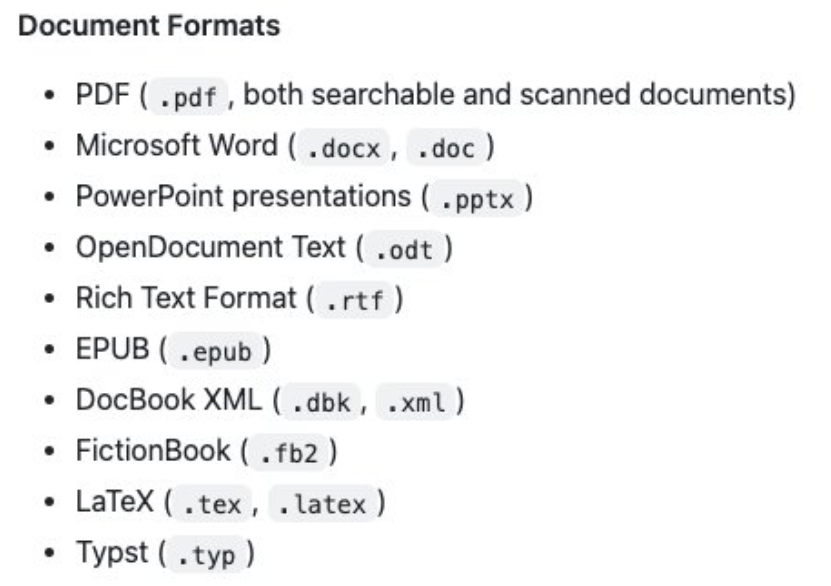
Function List
- PDF Text Extraction: Extract text content from PDF files.
- Image/PDF OCR: Optical character recognition of images and PDFs using Tesseract-OCR.
- Non-PDF Text Extraction: Extraction of text in other formats via Pandoc.
- local operation: Support local installation and operation, easy to control and manage.
- Open source and free: Based on the MIT license open source, free to use.
Using Help
Installation process
- Installing Python Packages:
pip install kreuzberg
- Installation of system dependencies:
- Pandoc: for non-PDF text extraction (GPL v2.0 license, used as CLI only).
- Tesseract-OCR: OCR for images and PDFs (Apache license).
Guidelines for use
- Basic use:
- Import the library and initialize it:
python

from kreuzberg import Kreuzberg

extractor = Kreuzberg()
- Extract PDF text:
python

text = extractor.extract_text('path/to/pdf/file.pdf')

print(text)
- Import the library and initialize it:
- OCR function:
- Perform OCR on images or PDFs:
python

ocr_text = extractor.ocr('path/to/image_or_pdf')

print(ocr_text)
- Perform OCR on images or PDFs:
- Non-PDF Text Extraction:
- Use Pandoc to extract text in other formats:
python

other_text = extractor.extract_text('path/to/other/file')

print(other_text)
- Use Pandoc to extract text in other formats:
Detailed function operation flow
- PDF Text Extraction:
- Make sure the PDF file path is correct.
- utilization
extract_textmethod to extract the text. - Process the extracted text data for subsequent operations.
- OCR function:
- Install and configure Tesseract-OCR.
- utilization
ocrmethod for OCR processing of images or PDFs. - Get and process OCR results.
- Non-PDF Text Extraction:
- Install and configure Pandoc.
- utilization
extract_textmethod to extract text in other formats. - Process the extracted text data for subsequent operations.
Through the above steps, users can easily get started with Kreuzberg text extraction operations to meet a variety of text processing needs.