
JVS Claw is an AI intelligent body platform launched by AliCloud in March 2026, based on the open source OpenClaw framework. Users don't need to know the code, don't need to apply for a large model key, don't need to tie a third-party chat tool, and can create their own Clawbot (crawfish) in three steps. It runs in the independent cloud sandbox provided by AliCloud ClawSpace, pre-installed Python, Node.js and other environments, can really perform the task of opening software, browsing the web, dealing with Excel, writing code and so on. The execution process is fully visualized, so users can watch the progress, intervene or take over at any time. Support for cell phones, web pages, Pad multi-terminal synchronized access, cloud mode 7 × 24 hours online, local mode (desktop client will be launched soon) to protect private data. The core selling point is extremely low threshold + full control + self-evolving skill base. Ordinary people can get started in 3 minutes, and developers can also use it to quickly test complex Agent scenarios. Currently, in the internal/public beta stage, free call credits are available on a first-come, first-served basis.
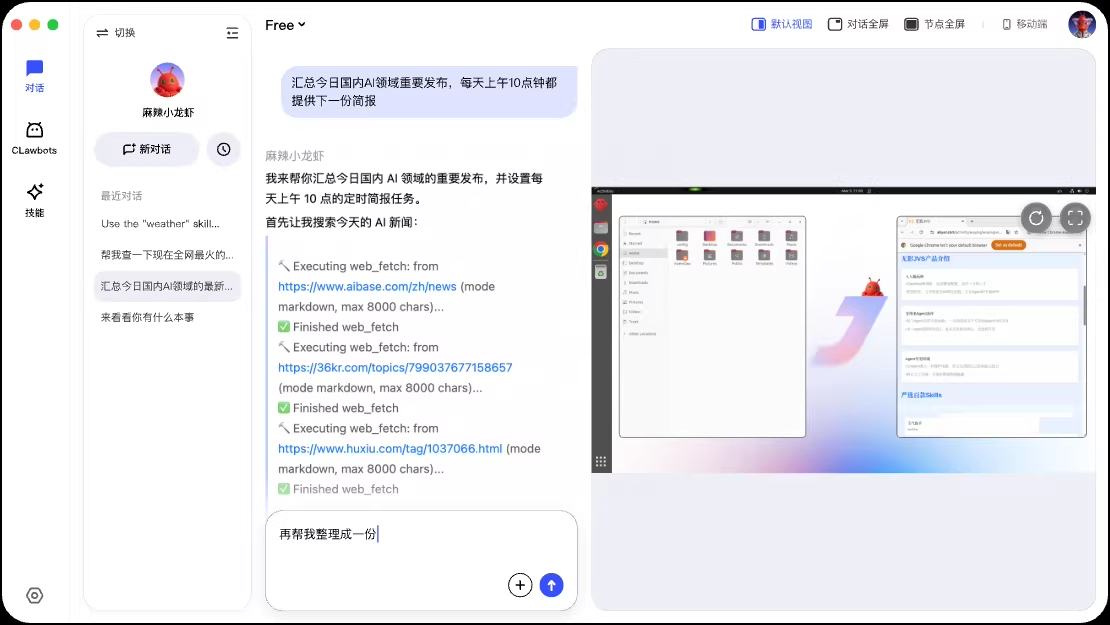
Function List
- One-click Clawbot creation in the cloud: no need to configure the environment, create AI intelligences in three steps directly on the web or in the App.
- Natural Language Driven Tasks: Chat in Chinese and give direct instructions, such as “Help me organize this month's reimbursement in Excel”.
- Real-time visualization of the execution process: The ClawSpace interface shows every step of the AI's operation, as clear as watching a video recording.
- Manual intervention/takeover at any time: you can manually operate the AI card to continue right away when it's validating codes or logging in.
- Self-evolving universal skills: When you don't have a skill, tell it to “search for one” and the AI will automatically find or create a skill.
- File upload and local data processing: upload local documents to the cloud for AI to analyze, supporting the secure use of private data.
- Multi-end real-time synchronization: cell phone to give instructions, computer to see the progress of the big screen, switch at any time.
- Cloud & Local Dual Mode: Cloud saves resources to be online all the time, and Local Mode (Coming Soon) runs on your own computer to protect your privacy.
- Skill Store Free Installation: Search, install, and update community or official skill, like a plugin for AI.
- Multi-Agent Collaboration (coming soon): In the future, we will be able to form AI teams and divide the work to complete complex projects.
Using Help
Visit https://jvs.wuying.aliyun.com/ to see the home page.
Step 1: Register and download the client
Open the website and click on “Experience Now”.
Currently, the mainstream way is to download the cell phone App (App Store search “JVS Claw” or Android Market search “JVS Claw” / “Shadowless JVS”). ).
You can also use it directly on the web, but the mobile app is a better experience and supports push alerts.
Register and login with your cell phone number or Aliyun account. After registration, the system will guide you to activate the service, and new users generally have 7-14 days free large model call credits (Credits), enough to run many tasks.
Step 2: Create your first Clawbot!
Once you have logged in, there is a prominent “Create Clawbot” button on the homepage.
There are only three things to do when you click in:
- Give it a name (e.g. “My Office Assistant”).
- Select ability preferences (office, programming, research, entertainment, etc.).
- Choose the underlying big model you want to use (the platform provides several by default, so choose whatever you want within the free quota).
Tap Confirm and it's created in a few tens of seconds. Each account can now create 1-3 Bots, depending on the official limit.
Step 3: Start chatting to give instructions
Once created, you will be taken to a dialog screen with Clawbot.
Just type and talk directly like WeChat, for example:
- “Help me organize all the invoice photos on my desktop into Excel, sorted by date.”
- “Go to Taobao and search for the latest price of iPhone 16 and pick the top three stores for a comparison table.”
- “Write a script in Python that crawls the Zhihu Hotlist, then help me analyze what people are talking about today.”
The most central operator interface: ClawSpace
After you place the command, the interface automatically cuts to ClawSpace (Cloud Sandbox Desktop).
You'll see a real picture of a cloud-based computer that the AI is operating in:
- Open your browser and search for something.
- New Excel Table
- Running Python Code
- Download files, upload results
The whole process is like someone is remotely operating your computer for you, and it's fast.
If the AI gets stuck (e.g., needs a verification code, logging into your account), the screen will pause and you can:
- Do it manually with the mouse and keyboard directly in ClawSpace.
- Or go ahead and tell it what to do next in the chat box
After the operation, the AI sends the results back to the chat box, usually with a link to download the file or summary text.
How do I transfer files to AI?
Tap the attachment icon in the chat box and select a file to upload directly from your phone/computer.
Once uploaded the AI will be able to see the contents of the file, such as Excel, PDF, code, images can be recognized.
The processed results can also be downloaded back locally with a single click.
How do you make it smarter? (evolving skills)
If it says “I don't have this skill”, you reply:
“If this skill does not exist, search and create it.”
The AI will go to ClawHub (skill center) to find an existing skill, or try to write a new one on its own.
The loaded skill can be used permanently, and the next time you encounter a similar task, you can call it directly.
Cloud vs Local Mode Switching
The default is cloud mode: all calculations are run in AliCloud, and only the screen is displayed locally, which is suitable for cell phones at any time.
If you want to work with particularly private local files, wait for the desktop client (Mac/Windows) to come online and then you can switch to local deployment:
Download the desktop client → Initialize the local environment with one click → Create a local Clawbot → All tasks run on your computer and the data does not leave the local area.
(Currently the desktop client is labeled Coming Soon, with updates expected to be pushed out soon.)
Daily Management Tips
- If you want to pause a mission that's gone on too long: Tap the pause button in ClawSpace or say “stop” in chat.
- Want to see the history: point to a previous conversation in the chat list and be able to revisit the execution.
- Save Credits: Use the free credits first for simple tasks, and then observe if it's worth spending money for complex tasks.
- Multi-end synchronization: the tasks created by the cell phone, open the computer web side can continue to see and operate the same.
The platform is still undergoing rapid iteration, and multi-agent team collaboration and more clients will be online soon. It is recommended to try a few more scenarios with the free quota first, and then decide whether to use it for a long time after familiarizing yourself with it.
application scenario
- Daily office efficiencies
Automatically organize reimbursement invoices, summarize multiple forms, draft emails, and generate weekly reports with full visibility and the ability to make changes. - Information gathering and analysis
Let AI go to major websites to compare prices, search news, analyze competing products, and output structured tables or reports. - Personal data processing
Batch rename photos, clean Excel data, extract tables from PDFs, especially for people who are not good at Excel. - Simple code tasks
Write crawler scripts, data processing gadgets, automate batch operations, locally or in the cloud. - Study and Research Assistance
Let AI help read papers, summarize web content, translate materials, and generate study notes. - Entertainment & Creativity
Generate PPT frames, write small essays, make emoticons, plan travel routes, the more you use it, the more it understands your preferences.
QA
- Is JVS Claw free?
New users have free credits (usually 7-14 days or fixed Credits), enough for daily trial. When the credits are used up, you will be charged according to the actual large model call volume, and the official will remind you in advance. - How does it compare to deploying OpenClaw directly?
JVS Claw is the AliCloud hosted version, zero configuration, cloud running, visualization process, multi-end synchronization. Native OpenClaw needs to build its own environment, manage API keys, and bind IM, which is suitable for deep customization by geeks. - Is the data safe?
Cloud mode with AliCloud isolated sandbox, data encrypted storage, will not go on the local leakage. Local mode (soon to be supported) data stays completely in your computer. - Does it support Chinese commands?
It is fully supported, and the Chinese language comprehension is very strong, and complex long sentences can be understood. - Is it commercially available?
Yes, but it depends on the model license you call and the Aliyun service agreement. For enterprise scenarios, it is recommended to contact AliCloud for official consultation. - When is the desktop client coming out?
The official website shows Coming Soon, with Mac and Windows versions expected to be pushed out soon in 2026.