EnConvo is an intelligent AI assistant launcher for macOS designed to boost user productivity by automating daily tasks. The platform integrates over 150 built-in tools and MCP support to learn and adapt to the user's workflow.EnConvo not only provides a unified entry point to its functions, but also has context-aware capabilities to recommend relevant tools and plug-ins based on the current app, selected text, Finder-selected files, and open web pages. With features such as voice input, real-time screen and camera sharing, EnConvo provides users with a seamless AI interaction experience to help them accomplish a variety of tasks efficiently.
Function List
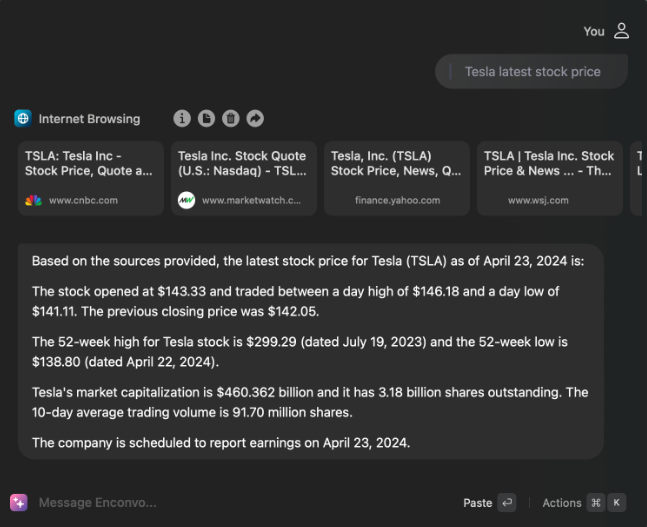
- SmartBar: A unified feature portal with access to AI features and 100+ plugins using simple @ commands.
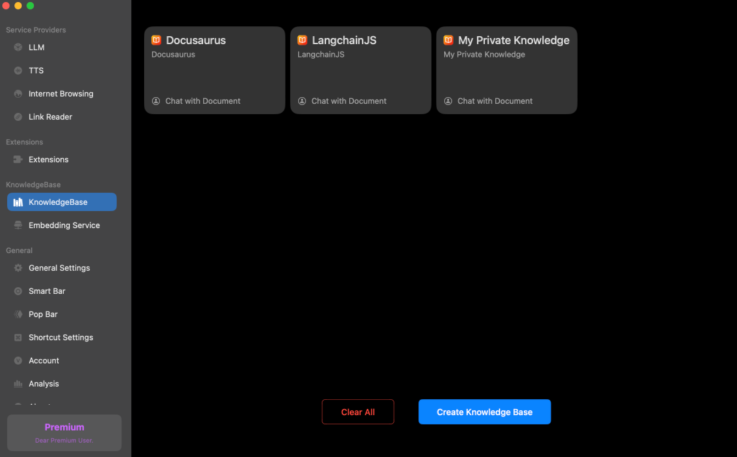
- repository: Create and manage knowledge bases from a variety of sources to find answers quickly using AI-powered vector search.
- PopBar: Display toolbars for selected text, quick access to over 100 features and plug-ins.
- workflow: Create customized workflows by combining and arranging system functions, tools, and workflows.
- context-sensitive: Automatically detects and utilizes contextual information to recommend relevant tools and plugins.
- voice input: Seamlessly integrates voice input throughout the system and supports multiple voice recognition providers.
- writing instrument: Provides tools for spell and grammar checking, translating, improving, summarizing and expanding text.
- Live screen and camera: Share real-time visual content with AI for instant, tailored help.
Using Help
Installation process
- Click the "Free Download" button to download the installer for macOS 13+.
- Open the downloaded installation package and follow the prompts to complete the installation.
- Once the installation is complete, launch the EnConvo application for initial setup.
Function Operation Guide
SmartBar
- Use the @ command to invoke SmartBar in any application.
- Enter a keyword or command and SmartBar will display the relevant functions and plug-ins.
- Select the desired function and the SmartBar will automatically perform the corresponding action.
repository
- Create a new knowledge base in EnConvo, add documents and web content.
- Use AI-driven vector search to quickly find the information you need in your knowledge base.
PopBar
- PopBar automatically displays the toolbar when text is selected.
- Select the desired function from the toolbar, such as translate, summarize or expand the text.
- Customize the tools and order in PopBar to fit your personal workflow.
workflow
- Create new workflows, combine and arrange system functions, tools and plug-ins in EnConvo.
- Quickly access customized workflows using SmartBar, PopBar, or shortcut keys.
context-sensitive
- EnConvo automatically detects the current application, selected text, Finder-selected files and open web pages.
- Recommends relevant tools and plug-ins based on contextual information to enhance work efficiency.
voice input
- Enable the voice input function in the system settings.
- Use customized shortcuts to activate voice input, or use press-and-hold shortcuts for quick transcription.
- Choose a speech recognition provider such as Microsoft, AssemblyAI, Deepgram, Groq, or a native Whisper model.
writing instrument
- Open the writing tool in EnConvo and select the desired function, such as Spelling and Grammar Check, Translate, Improve, Summarize, or Extend Text.
- Type or paste text and EnConvo will automatically process it and provide suggestions.
Live screen and camera
- Enable live screen and camera sharing in EnConvo.
- Share current screen content or camera feed with AI for instant, tailored help.
Recommendations for more efficient utilization
- Customized shortcuts: Customize Enconvo's shortcuts according to your usage habits, making the operation smoother.
- Understanding and using plug-ins: Visit the plugin store regularly to keep plugins updated and explore new features.
- Utilizing the Agent model: Customize automated processes for your daily tasks to reduce duplication of work.