
WorkBuddy is a desktop-level AI Agent workbench launched by Tencent Cloud, aiming to let AI evolve from “chatting with you” to “working for you”. Unlike traditional AI dialog tools that run in the browser, WorkBuddy is a standalone software installed on the computer that has the ability to manipulate local files. Users only need to give commands through natural language, WorkBuddy can autonomously complete complex tasks such as reading files, analyzing data, organizing tables, writing documents and even generating PPTs in authorized folders. It is not only for programmers, but also designed for HR, operations, administration and other non-technical positions in the workplace, is committed to becoming an “AI digital employee” that can understand human language and perform multi-step tasks.
Function List
- Autonomous operation of local files: Read files directly from computer folders after obtaining user authorization, support batch organizing, renaming or archiving of Word, Excel, PDF and other formats.
- Intelligent Document GenerationIn a single sentence, automatically generate a fully structured Word document, Excel pivot table, or a beautiful PPT presentation based on local material.
- Complex task disassembly (Agent)The built-in intelligence can break down a vague task such as “planning an annual meeting” into specific steps such as “collecting venues”, “calculating budget”, “generating a flowchart” and execute them one by one.
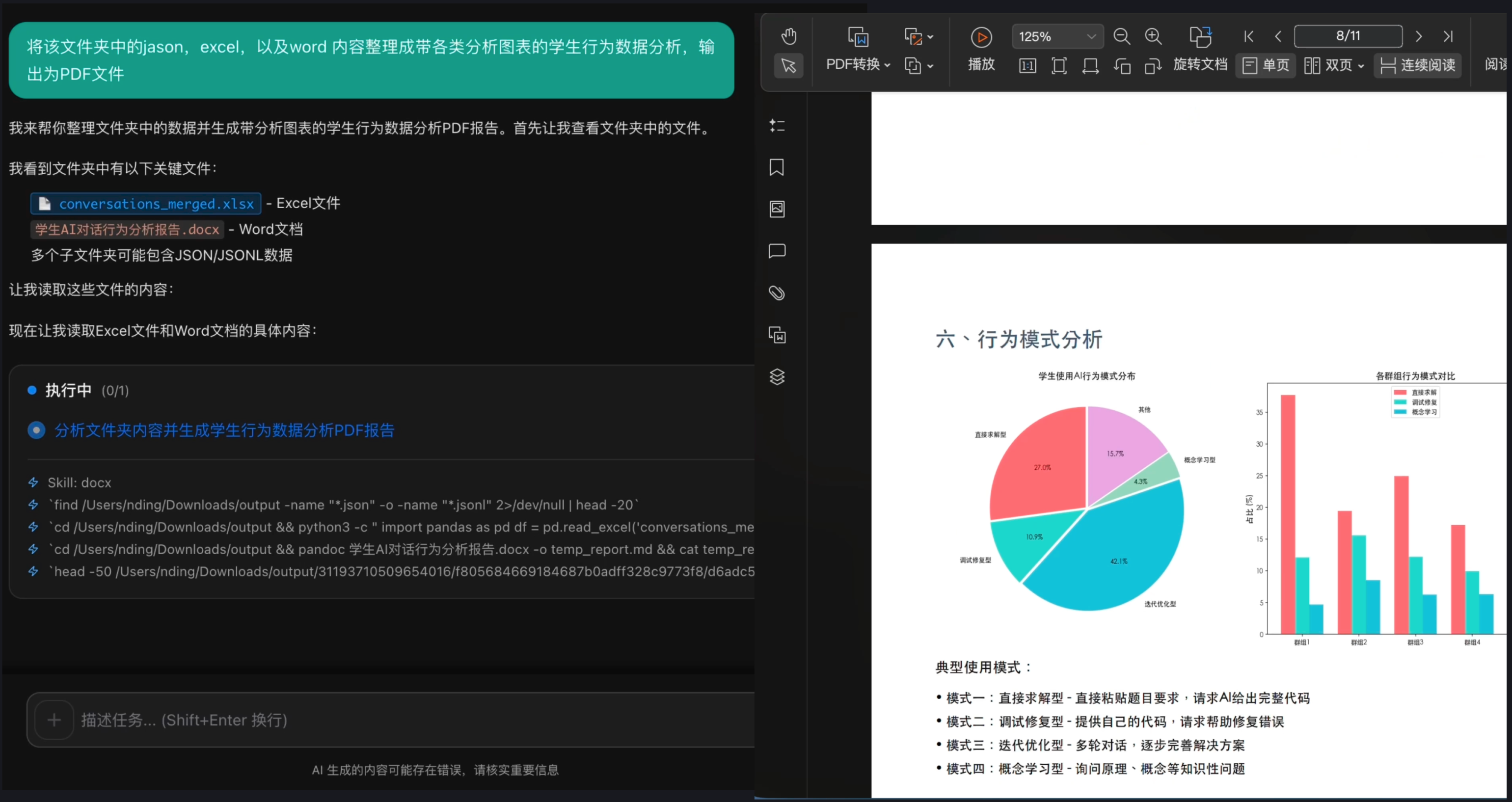
- Multimodal Content Creation: Support for generating poster images based on text descriptions, or generating visual graphical analysis reports combined with local data.
- Cross-application collaboration (MCP): Support for Model Context Protocol (MCP) enables connectivity and scheduling to other native software or API interfaces, breaking down information silos between software.
- Multi-model switching: Built-in a variety of mainstream large models, users can choose different modeling engines according to the difficulty of the task, balancing speed and quality.
- Privacy Security FenceAI can only access folders that are explicitly authorized by the user, ensuring that local private data is not leaked.
Using Help
WorkBuddy is designed to be “zero-barrier”, making it easy for non-technical users to get started. Below is the detailed operation procedure:
1. Download and installation
Since WorkBuddy is a desktop client software, you need to first visit the https://www.codebuddy.cn/work Get the installer (currently in internal beta, may need to apply for eligibility).
- Download the installation package for your operating system (Windows or macOS).
- Double-click to run the installer and follow the instructions to complete the installation.
- Launch the software and log in using your Tencent Cloud account or WeChat Scan.
2. Initialization configuration and authorization
The core of WorkBuddy is to manipulate local files, so “authorization” is a key step:
- Setting up the workspace: The first time you enter, the software prompts you to add a “working folder”. This is where the AI is active.
- Confirmation of authority: Click “Add Folder” and select the directory where you want AI to work with your documents (e.g. “D:\My Work Documents”) WorkBuddy promises to read and write only to this directory and not to touch any other area of your computer.
3. Daily use process
WorkBuddy's interface is very simple and consists mainly of a dialog box and a file preview area.
- issue instructions:
Enter your requirements in the dialog box, e.g., “Help me summarize all the Excel sheets in the ‘February Sales Data” folder into a master table and analyze which region had the highest sales." - Task deconstruction and validation:
WorkBuddy doesn't do anything right away, it replies with a “plan of execution”:- Reads 10 Excel files in a folder.
- Extract the “Sales” and “Region” columns.
- Consolidated data.
- Generate analysis charts.
It will start working only after you click “Confirm Execution”.
- Viewing the execution process:
The screen displays in real time which file the AI is opening and what it is writing, as if you were watching a colleague operate a computer. - Receiving and Inspection Results:
After the task is completed, WorkBuddy will generate a new file directly in your folder (e.g. “February Sales Summary_Analyzed.xlsx”). You can directly double-click to open the acceptance, if you are satisfied, the task is over; if you are not satisfied, you can then say: “Change the chart to a bar chart”, it will be immediately modified.
4. Advanced techniques: use of skills packages
WorkBuddy supports the installation of specific “Skills” to enhance capabilities:
- In the “Skills Center” of the software, find the skills that fit your position, such as “Resume Screening Assistant” or “Competitive Analyst”.
- After installing it, just drop a bunch of resume PDFs into the folder, say to it “Use Resume Screening Assistant to help me pick out candidates with 3+ years of experience” and it will automatically output a screened Excel list.
application scenario
- Administration & Finance - Invoicing
Put hundreds of PDFs of electronic invoices into a folder and let WorkBuddy “extract the invoice number, amount, and invoice date of these invoices into an Excel table. It automatically recognizes the OCR content and enters it accurately. - Marketing Operations - Competitive Research
Give WorkBuddy a list of competing websites or a bunch of industry report PDFs, and give the instruction: “Read these materials and help me write a 2,000-word report analyzing the competitors and generate a PPT comparing the strengths and weaknesses”. It can be from reading to output in one go. - Human Resources - Recruitment Screening
When HR receives a large number of resumes, they don't have to open them one by one. Simply put your resume in a specific directory, ask WorkBuddy to “find all candidates who are familiar with Python and fluent in English,” and you'll get an accurate list in seconds. - Sales Management - Tender Generation
Salespeople can feed WorkBuddy their historical bids and the customer's new requirements document and ask it to “draft a new bid proposal based on the customer's new requirements, referencing the format of the old bid”.
QA
- What is the difference between WorkBuddy and ChatGPT?
ChatGPT Runs mainly in the cloud and can only process text you paste to it; WorkBuddy runs on your computer desktop and can read, modify and generate files directly from your hard disk, with much stronger execution. - Is it safe to let AI read my local files?
WorkBuddy uses a strict sandboxing mechanism, it can only access that folder you manually authorized, and can't access other locations in your computer. And Tencent Cloud promises that Enterprise Edition data will not fall off the disk to protect the safety of business secrets. - Do I need to write code to use it?
No need at all. WorkBuddy is designed for non-technical people, all you need to do is describe your needs in vernacular (natural language) and the AI does the rest automatically. - What file formats are currently supported?
Currently supports mainstream office formats, including Word (.docx), Excel (.xlsx), PowerPoint (.pptx), PDF, TXT and various image formats.