
QClaw (nicknamed “Crayfish AI”) is an out-of-the-box localized AI Agent (Intelligent Body) desktop assistant created by Tencent Computer Butler based on the OpenClaw open source ecosystem. Its core vision is to lower the threshold for the use of AI tools, through a minimalist packaging design, so that users do not need to know the complex environment configuration and command line operation, just three steps to download and install can be used immediately.QClaw built-in a variety of domestic top quality large language models, with a strong contextual memory capabilities and a rich skills (Skills) ecosystem.
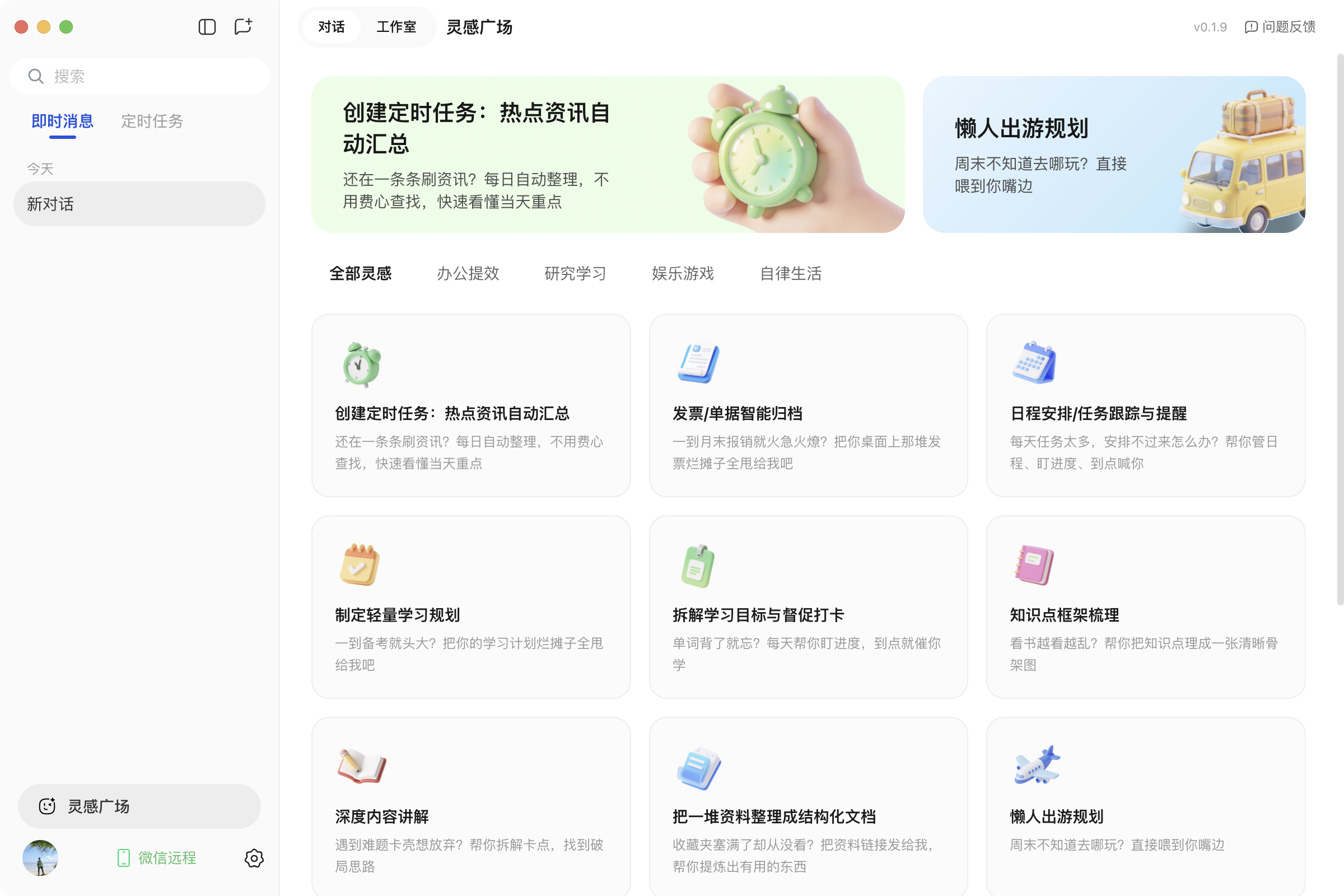
The most revolutionary feature of this product is the realization of the original “WeChat Connected” control function. Users only need to open the “QClaw Butler” WeChat app on their cell phones to break through the space limitations and send text commands to the computer in the power-on state anytime, anywhere.After taking over the commands, QClaw will automatically carry out the complicated tasks of file extraction and analysis, format conversion, and data capture from the whole network locally, and send the processed files directly to the mobile phone through the app. QClaw can also send the completed documents to the cell phone directly through the small program. The newly launched "Inspiration Square" has preset a large number of templates covering the four scenarios of office, research, self-media creation and life for novice users, so that even if they don't know how to write commands, they can still run the automated program with a single click. All core file processing is done locally to ensure the absolute safety of user privacy, which is a great digital partner for workers and self-media creators to enhance productivity.
Function List
- WeChat Small Program Direct ControlQClaw is the first computer program in the world that allows users to send natural language commands from their cell phones to their computers to remotely control their computers to perform complex computing tasks by breaking down cross-device barriers through the QClaw Butler WeChat mini program.
- Bi-directional transfer of local computer filesThe following is a list of the most popular features of the WeChat app: support in WeChat apps to directly receive the results of the documents generated by AI processing on the computer side, as well as the ability to upload the files on the cell phone to the computer side in one click to the AI processing.
- Built-in “Inspiration Square” skill storeThe program provides a large number of ready-made task templates (Skills) for the four core scenarios of “Office Efficiency, In-depth Research, Entertainment & Gaming, and Self-discipline”, which can be run by clicking on “Use Now” without writing commands.
- Fully Automated Self-Media Content Production EngineIt provides a one-stop fully automated graphic generation chain covering “topic research, material collection, outline generation, content writing, and multi-platform copywriting adaptation”, solving the mechanical labor pain points of self-media people.
- Built-in a variety of high-quality domestic large modelsThe software natively integrates a number of top domestic large language model resources, without the need for cumbersome API configuration, and supports the free switching of the underlying large model for different application scenarios.
- WeChat Remote Timed Task Management: Supports remote creation of countdown or periodic timed tasks on WeChat, enabling computers to automatically perform cleanup, summarization, clocking, etc. at specified times and provide real-time feedback to WeChat on progress.
- Strong local security and privacy: Utilizing the local computing environment to run core data tasks, so that important personal assets and work documents can be “data security does not go out of the local”.
- Smoothly associating native OpenClawThe system is designed to meet the customization needs of geeky gamers by providing advanced users with a technical foundation the ability to associate and take over the installed local open source version of the OpenClaw system with a single click.
Using Help
I. Detailed installation process and environment configuration preparation
QClaw adheres to the design concepts of “zero threshold” and “usable by everyone”, and completely abandons the complicated configuration requirements of traditional AI open source intelligence projects. Only three simple steps to complete the entire environment, your personal computer into a 24/7 standby intelligent desktop assistant.
- Get the official installer:
Open any browser on your computer and visit the official website of QClaw (https://qclaw.qq.com/). At the prominent position of the home page, the system will automatically recognize your computer operating system, no matter you use macOS Apple system, or mainstream Windows system, just click the corresponding download button, you can get the latest version of the complete software installation package. - No-brainer installation for local environments:
Double-click on the installer you just downloaded. For most novice users, just click “Next” all the way through the installation process, and QClaw comes with all the dependencies and native model interfaces you need to run the program inside the installer. There's no need to learn about Python environments, configure Node.js, or tweak esoteric code parameters - it really works right out of the box. Once installed, a shortcut with a dedicated Crayfish AI icon will be generated on your desktop. - Core steps: micro letter small program sweep code direct connection binding:
- Open the freshly installed QClaw software on your computer, the initial interface will display an exclusive QR code for WeChat binding.
- Grab your phone, open WeChat, and type “QClaw Butler” in the search bar to find the official WeChat app (this is the core highlight of this version update, replacing the original WeChat customer service number entrance).
- Use WeChat's own “Sweep” function to scan the QR code on the computer screen to confirm authorization to log in.
- At this point, you will hear a system tone, which means that your cell phone WeChat applet has established an encrypted end-to-end direct connection with QClaw on your computer. From now on, as long as your computer stays on and connected, you can give work instructions to your computer from your cell phone anytime, anywhere.
II. Detailed Operation Guide of Main Functions and Characteristic Scenarios
After completing the base bundle, you'll unlock an amazing array of automated operational experiences. Here's a thorough walkthrough to help you get through the newbie phase quickly:
1. Breakthrough time and space limitations: WeChat remote control and two-way file transfer operation
This is QClaw's most disruptive under-the-hood capability, tailored for the modern, high-intensity workforce:
- Issuance of complex textual instructions: When you are out of the office (e.g. on the commuter subway or on a business trip), you suddenly remember that there is an important piece of data that needs to be processed. All you need to do is open the WeChat app and type in the instruction as if you were chatting with a real assistant: “Please help me find the file named ‘Q1 Sales Data Organization.xlsx” on my computer desktop, extract the core profit indicators in it, and generate a short text report ". The command is instantly sent down through the cloud, and QClaw on your computer screen then takes over the file system and begins to silently execute the automated process.
- Real-time task monitoring and acceptance of resultsQClaw will not only show you the real-time progress bar of “reading files” and “analyzing data” on the applet side, but also send the final document directly to the chat interface of the applet when the task is finished. You can directly click on the preview, or forward it to the WeChat workgroup.
- Cell Phone to PC Reverse TransferIf you receive a large file or a reference picture from a customer in WeChat, you can send it directly to the “QClaw Manager” app. The file will be automatically synchronized and downloaded to the designated folder on your computer desktop, without the need to go through a third-party transfer assistant back and forth.
2. Say goodbye to cue word anxiety: Play "Inspiration Square" to run the ecosystem with one click.
If it's your first time to contact an AI Agent, you may face the dilemma of “don't know what you can ask it to do” or “don't know how to write commands”. For this reason, QClaw has launched the "Inspiration Square" module:
- Finding inspiration for useClick on “Inspiration Square” in the software interface on your computer or in the menu bar of WeChat mini program. You will see that the system has sorted out four core application scenarios for you: “Office Efficiency”, “In-depth Research”, “Entertainment & Games” and " Self-discipline life".
- Browse the pre-set Skills cards.In these scenarios, there are a large number of out-of-the-box task cards that work just like a cell phone app. For example, “intelligently file month-end invoices”, “automatically summarize daily hot news”, “disassemble complex math problems”, “generate a weekly English study plan”, etc. plan" and so on.
- Foolproof one-click runtime operation: Select the task you are interested in and click “Use Now”. At this point, you don't have to think of a long-winded cue command. The system will automatically load the background action chain that best suits the task. All you need to do is to follow the interactive fill-in-the-blanks questions that pop up in the interface, enter a small amount of necessary information (e.g., specify the name of an industry's information, or the time period of the plan), and the AI will automatically take over the calculation and deliver a professional answer.
3. Complete emancipation of productivity: a fully automated content creation and production line for the self-published media
For self-media practitioners, copywriters, or users who need to output graphic reports on a regular basis, QClaw is able to compress mechanical labor, which was originally measured in days, into a few minutes:
- The first ring: efficient topic selection research and automatic analysis (traditional time-consuming 1 hour → AI time-consuming 15 minutes)
In the dialog box, type “Help me search for the top picks across the web in the last two weeks on ‘AI tools to improve workplace efficiency”, and compile a list of 10 candidates with a heat assessment score". qClaw will automatically control the browser to crawl the content of the list on each platform. Clustering topics and extracting high-frequency keywords, handing you a clear hot report. - Ring 2: Accurate Material Crawling and Extracting Summaries (Traditional 3 hours → AI 30 minutes)
After selecting the topic, then input: “around the selected topic, the whole network to collect 15 latest high-quality related articles, extract the core information, with sources, and finally packaged output Word document”.AI will automatically flip through the extraction, to save you the boring web page reading time. - Ring 3: Logical Outline Generation and Body Writing Expansion
Based on the material just collected, input the instruction: “Give me an outline of about 3,000 words of dry goods for newcomers in the workplace”. After the outline is confirmed to be correct, continue to input instructions: “According to the outline expanded into a small red book style notes, the requirements of the title eye-catching with a pain point, the body of the text more use of Emoji emoticons, and accompanied by the appropriate tags (# keywords)”. - The fourth ring: cross-platform style adaptation and one-click matrix distribution
After the article was produced, continue to have QClaw execute: “Take the body of this note, tightly control the word count and rewrite it into a spoken line script suitable for video narration on Beep (B).” Easily accomplish the conversion of scripts from different platforms.
4. Intelligent and caring housekeeper: scientific management of remote timing and periodic tasks
In order to make the computer truly “self-managed and time-triggered”, QClaw is equipped with powerful timed task attributes:
- Establishment of regular clearance and reporting mechanisms: On the applet side, you can create a custom rule: “Every Friday at 17:30, automatically clean up my computer's downloads folder and package and categorize my browsing and work logs for the week and send them to my WeChat”.
- Task Status Traceability Feedback: Timed tasks are triggered precisely as long as the computer is on and connected. In the task history panel of the applet, you can clearly see the results of each timed execution. When you find a change in demand, you can edit or terminate the task on your phone at any time.
III. Advanced settings and model management for geek users
While the QClaw focuses on simplicity and ease of use, it also doesn't abandon advanced players with advanced needs:
- Flexible switching of the underlying large model arithmeticQClaw natively integrates a number of high-quality large language models from the first echelon in China. Users can click on the model icon in the upper right corner of the software, according to the specific tasks (such as processing long text code or the requirements of strong network sense of the text) in the system menu to switch the current call of the underlying large model core, to give full play to the expertise of the various large model features.
- One-Click Fusion Interconnect with Native OpenClawIf you are a developer and have already gone through the trouble of deploying the complex native open source OpenClaw locally, you can simply find the “Associate with Native OpenClaw” option in QClaw's advanced settings page. Once bound, QClaw instantly transforms into a lightweight WeChat remote control, perfectly blending the geek-level expandability of the open source system with the mobile convenience of small programs.
application scenario
- Workplace Office Efficiency and Digital Cluttering
White-collar workers are often sliced up by repetitive digital chores such as sorting documents, extracting and summarizing data, and filing receipts and invoices. With QClaw, you can let it take over this kind of high-frequency mechanical labor by giving simple task instructions. For example, let it automatically read long Excel files to refine business profit indicators, or organize the scattered files in the download directory. ai takes over the repetitive operations, so that your energy can be re-invested in the core business and creative planning. - Self-media graphic generation and matrixed multi-platform operation
For independent creators or MCN operators, it usually takes more than a day to search for topics, read webpages and check materials, sort out outlines, and lay out articles, QClaw provides multi-version rewriting capabilities from capturing keywords extracted from hot searches, generating outlines of explosive points, and outputting various platforms such as Xiaohongshu/public numbers/short videos, etc., adapting to various platforms, so that in one week, we can produce high-quality and high-efficiency graphic materials that would otherwise take a month. material in a week, significantly breaking the problem of content breaks. - Cross-device remote file transfer and 24x7 mobile working
In the commute time, travel or after work in case of urgent matters, there is no computer around will be very passive. With QClaw WeChat app, users can break through the spatial limitations and interconnect with computers, not only can they transfer files from their cell phones to their computer desktops, but also send text commands directly to their computers to request that important reports be immediately retrieved and sent back to WeChat, thus completely solving the pain point of relying on computer peripherals, and constructing a true mobile all-weather office ecosystem. - Personalized information retrieval and personal self-management assistance
When you want to do in-depth research on a cold technology field or develop a good habit of reading and clocking in English every day, QClaw can automatically capture and deconstruct the cutting-edge information papers and self-discipline. By selecting the preset task cards related to “In-depth Research” and “Self-discipline” in "Inspiration Square", QClaw can not only automatically capture and deconstruct cutting-edge information papers, but also set up customized periodic tracking tasks to supervise the implementation of the plan, playing the role of an exclusive 7×24 knowledge tutor. QClaw not only automatically captures cutting-edge information papers and deconstructs and analyzes them, but also sets up customized periodic tracking tasks to supervise the implementation of the plan.
QA
- What is QClaw? How is it different from the native open source OpenClaw?
QClaw is an AI Agent assistant (nicknamed “Crayfish AI”) specially localized and reconstructed by Tencent Computer Butler based on OpenClaw's huge open-source ecosystem technology. The essential difference is: OpenClaw requires users to have a technical foundation, and the installation environment configuration is more complex; while QClaw focuses on “one-key installation, zero threshold”, and natively comes with a variety of selected domestic models and a very unique WeChat interconnection console, belonging to the out-of-the-box version of the super-simplified evolution of the product. - How does QClaw's “WeChat Remote Control PC” function work?
After installing and running QClaw on your computer, open WeChat on your cell phone, search for the “QClaw Manager” app and scan the QR code displayed on your computer to establish an exclusive binding connection. After the binding is completed, any text commands you send in the input box of the app will be instantly pushed to the local computer and drive the AI to perform the corresponding tasks. The file generated after the task is completed will also be sent to your phone directly through the chat window of the app. - Is data security guaranteed when using QClaw for internal company information and private documents?
QClaw focuses on the underlying concept of “localized AI”, and most of the tasks it performs are manipulating the local file system. This means that your forms, private photos, and company financial documents are processed and analyzed in a closed loop within the local computer, so that “data security does not go out of the local area”, which protects the privacy of sensitive enterprise-grade information better than platforms that have to upload the full amount of files to the cloud. - As a beginner, what if I'm not very good at writing complex prompts that an AI can understand?
There's no need to worry about writing bad prompts at all. In this major update, QClaw introduces the “Inspiration Square” feature. QClaw has built in a wealth of "out-of-the-box" skill cards for self-publishing, office and other scenarios. All you need to do is to select the task you want, do a few simple fill-in-the-blank questions to supplement the core keywords, and the background will automatically load the perfectly polished instructions to run the task. - If I'm not satisfied with the built-in models, does QClaw support me to replace the other underlying big models myself?
Supported. In order to take into account the specific needs of professional users, QClaw opens up model switching privileges in the system settings. Users can freely switch between the built-in domestic models at any time, while users with technical foundation can also call their own privately deployed and customized advanced AI services by associating the local OpenClaw project in the system.