Mem.ai is an AI note-taking app designed for busy professionals, students and creatives. Unlike traditional folder-based systems, Mem uses AI to automatically organize and connect information from a variety of sources such as notes, emails, calendars, and more. It aims to be a comprehensive knowledge assistant that changes the way users capture, organize and recall information.
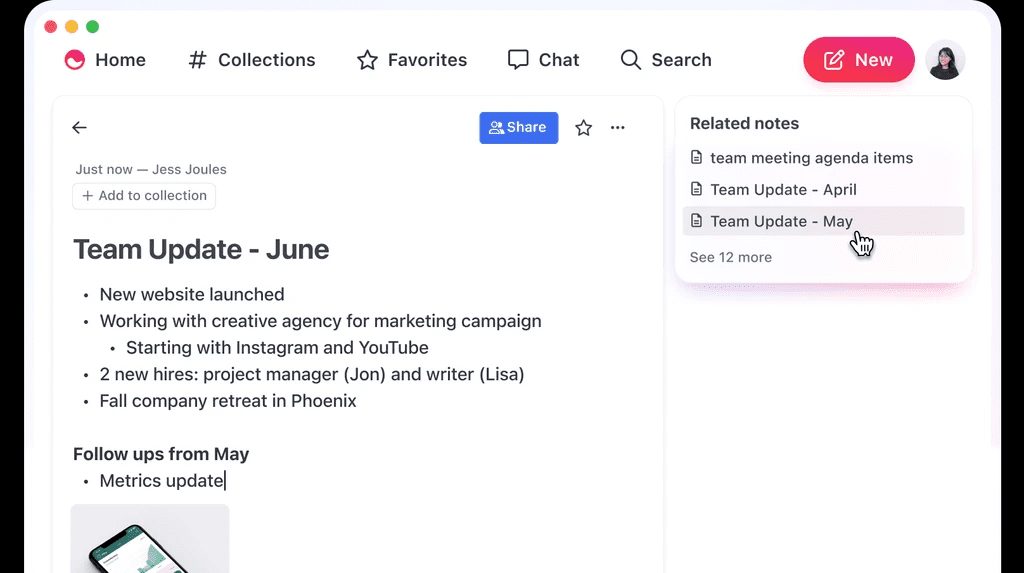
The app supports offline mode, iOS apps, Markdown editing and GPT-4 integration, as well as intelligently recommending relevant notes, providing smart search capabilities and AI-powered collections to facilitate efficient organization of information.
Function List
- Smart Notes: Automatically organize and categorize note content through AI.
- information integration: Automatically integrate email, calendars, tasks, and more into one platform.
- AI Recommendations: Provide personalized content recommendations based on user habits and data.
- Quick Search: Utilize natural language processing techniques to quickly find the information you need.
- cross-platform synchronization: Supports multi-device synchronization for accessing notes anytime, anywhere.
- safety: The privacy and security of user data is highly valued.
Using Help
Smart Notes
- Open the app and click the "New Note" button.
- Enter the content of your notes and AI will automatically recognize and categorize them.
- Use the tagging feature to add tags to your notes to make them easier to find later.
information integration
- In Settings, connect your email and calendar accounts.
- Mem.ai automatically synchronizes this information and provides relevant alerts when needed.
AI Recommendations
- Based on your usage habits, Mem.ai will recommend relevant content on the homepage.
- You can tweak the recommendation algorithm to better suit your needs by liking or disliking it.
Quick Search
- Enter a keyword or natural language query in the search bar.
- Mem.ai quickly returns relevant results, including notes, emails, and calendar events.
cross-platform synchronization
- Ensure that you are logged into the same account on all devices.
- All notes and information are automatically synchronized to ensure you have access at all times.
safety
- Mem.ai uses advanced encryption technology to ensure the security of user data.
- Regular security audits are conducted to ensure system security and stability.